Palette, iCE colours and 24-bit colour
A cell has a foreground and a background, each one of 16 colours, or under the IRC target one of mIRC's 99. This page covers the 16 colours, mIRC's colours past them, the Palette dock that picks them, iCE colours (the setting that decides whether the bright eight work as backgrounds), and what happens to files that use more colours than 16.
What ANSI art is introduces the 16 colours and iCE colours.
The 16 colours
Blockwright draws with the 16 colours of the PC's VGA text mode, numbered 0 to 15. Colours 8 to 15 are the bright versions of 0 to 7, in the same order:
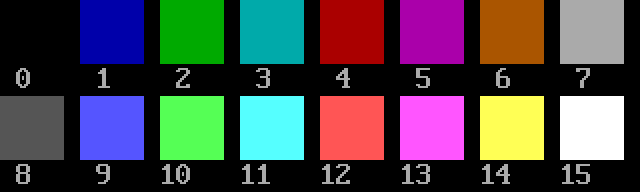
| Number | Colour | RGB | Number | Colour | RGB |
|---|---|---|---|---|---|
| 0 | black | #000000 |
8 | dark grey | #555555 |
| 1 | blue | #0000aa |
9 | light blue | #5555ff |
| 2 | green | #00aa00 |
10 | light green | #55ff55 |
| 3 | cyan | #00aaaa |
11 | light cyan | #55ffff |
| 4 | red | #aa0000 |
12 | light red | #ff5555 |
| 5 | magenta | #aa00aa |
13 | light magenta | #ff55ff |
| 6 | brown | #aa5500 |
14 | yellow | #ffff55 |
| 7 | grey | #aaaaaa |
15 | white | #ffffff |
This is the order the PC numbered its colours in, and the order the Palette dock, the Colours menu and blockwright-cli use. The ANSI escape codes number the first eight differently (31 is red, 34 is blue); Blockwright converts between the two when it reads and writes .ans files.
mIRC's 99 colours
A document under the IRC target (Format > Target > IRC, no shortcut) can also use mIRC's colours 16 to 98, after the 16. A cell holds each of them as its exact RGB, and IRC text writes it as its mIRC number (IRC). A Micron page for NomadNet writes it as that RGB (Export for NomadNet). Changing the target changes what the Palette dock offers, not the cells: a cell in one of these colours keeps it under the ANSI target.
An .ans, XBIN or BIN file holds only the 16. Saving a cell in any other colour to one, under either target, writes the nearest of the 16 and warns: 3 cells are in colours the file can't hold, saved as the nearest of the 16 (1 cell is in a colour … for one). A project keeps them.
The Palette dock
The Palette dock is on the right of the window and can't be closed. It shows the pen on the left and the 16 colours in two rows of eight beside it, 0 to 7 on top. Under the IRC target, mIRC's 16 to 98 follow under the pen in smaller swatches, in rows of 12, so the greys 88 to 98 make a row of their own; below them, B, I and U buttons turn bold, italic and underline on and off for the pen (the glyph brush writes them as ^B, ^] and ^_).
- Left click a colour to make it the pen's foreground, right click it to make it the background.
- The colours in the pen are marked: an F at the top-left of the foreground's swatch and a B at the bottom-right of the background's, each swatch framed.
- The pen, on the left, is two overlapping squares: the foreground at the top-left over the background at the bottom-right.
- The bent arrow at the pen's top-right swaps the foreground and the background (Colours > Swap Colours).
- The small grey-over-black squares at the pen's bottom-left set the pen back to grey on black (Colours > Default Colours, Ctrl+D).
Hovering over the arrow or the small squares names the item and its key, if it has one; hovering over one of mIRC's swatches names it and its RGB, such as mIRC 16 (#470000). The swatches show each colour as it is, whatever the iCE setting.
The keys that step the pen through the colours, the eyedropper, and how keyboard mode types in the pen are on Keyboard mode, F-key glyph sets and the pen.
iCE colours
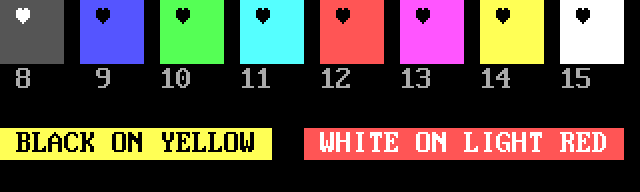
On the PC's text screen a cell's background could only be one of the first eight colours. The bit that would have made the background bright made the cell blink instead. iCE colours turn that bit back into a bright background: with iCE on, all 16 colours work as backgrounds and nothing blinks.
Here are the eight bright backgrounds, and two lines of text on bright backgrounds, with iCE colours on:
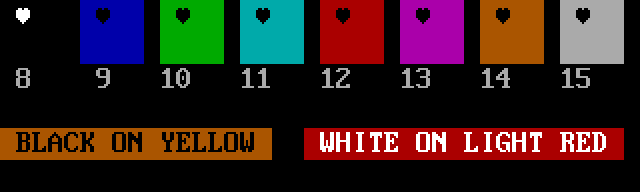
And the same cells with iCE colours off. Each bright background shows as its dark colour, the background minus 8: dark grey becomes black, yellow becomes brown, white becomes grey. The cells blink in a viewer that blinks; Blockwright draws them as they look while the blink is showing, and doesn't animate them:
Turning it on and off
- On the start screen, iCE colours (16 background colours, no blink) is ticked to start with, so a new canvas has iCE on.
- File > New makes a canvas with iCE on.
- View > iCE Colours turns it on or off for the canvas you have open. Each change is one step on the undo stack (iCE Colours On, iCE Colours Off).
Turning iCE off changes how the canvas is shown, not its cells: a cell with a bright background keeps it, shows it as the dark colour, and gets it back when iCE goes on again. You can still pick a bright background with iCE off; it shows dark too.
Live text layers are redrawn for the new setting in the same undo step. A text style in the Library that needs iCE colours can't be used while they are off.
In the file
The setting is saved in the file's SAUCE record, so a viewer shows the piece the way it was drawn. Blockwright writes a SAUCE record into every .ans it saves.
- Saving with iCE on, a bright background is written as the blink bit, which is what iCE viewers read as bright.
- Saving with iCE off, a bright background is written as its dark colour with the blink bit set: what the canvas showed.
- Opening a file, Blockwright reads the setting from its SAUCE record. A file with no SAUCE record opens with iCE on.
- Opening a file whose SAUCE says iCE off but which has bright backgrounds anyway (from the codes
100to107, or a 256-colour or 24-bit background read as a bright colour, below), Blockwright turns iCE on so the backgrounds show. With iCE on nothing blinks, so the cells that blinked lose their blink; a blinking space never showed its blink and goes without a word. When a cell with a glyph in it lost its blink, saving warns:N cell(s) lost their blink when the file was opened with iCE colours, and this save doesn't put it back, andblockwright-cli convertwon't write the file unless given--allow-lossy(blockwright-cli).
For an iCE-off file with one blinking X and a bright background, blockwright-cli convert in.ans out.ans prints this and exits with status 1:
blockwright-cli: warning: in.ans: 1 blinking cell loses its blink: bright backgrounds need iCE colours, where blink is a bright background
blockwright-cli: out.ans: not written: the conversion loses data (--allow-lossy writes it anyway)
A file with bright backgrounds and no blinking glyph converts without a warning, and the new file's SAUCE says iCE on.
24-bit and 256 colours
An .ans, XBIN or BIN file is saved in the 16 colours only. Blockwright reads files that use more and fits each colour to the nearest of the 16, under either target:
| In the file | Read as |
|---|---|
ESC[38;2;R;G;Bm, ESC[48;2;R;G;Bm |
A 24-bit foreground or background. |
ESC[1;R;G;Bt, ESC[0;R;G;Bt |
PabloDraw's 24-bit foreground (1) or background (0). Black, 0;0;0, means no 24-bit colour: the colour the other codes set shows again. |
ESC[38;5;Nm, ESC[48;5;Nm |
One of xterm's 256 colours: 0 to 15 the 16 colours, 16 to 231 a 6 × 6 × 6 colour cube, 232 to 255 a ramp of greys. |
ESC[90m to ESC[97m, ESC[100m to ESC[107m |
A bright foreground or background. |
The nearest colour is the one with the least squared distance in red, green and blue; a tie goes to the lower number. So ESC[38;2;200;30;30m reads as red (4), and ESC[48;5;21m, xterm's pure blue, as blue (1).
An XBIN file can carry its own palette. Blockwright keeps it when the piece is saved as XBIN again and leaves it out of any other format (saving warns: the file's own palette is left out (only XBIN keeps one)). The editor shows and draws such a piece in the standard 16 colours.
Describes Blockwright 0.1.0 (12ee9ef).