Generator layers and scripts
A Generator layer holds the output of a program: the program draws the layer's cells from a few parameters, and the layer keeps the cells it drew. Change a parameter in the Layers dock and the program runs again. This page covers the generators the samples carry, the parameter form, running, seeding and baking, how a generator is written and saved, and its limits. How a Generator layer sits among the other kinds is in Layers; the commands that add and run generators outside the window are in the CLI. Tutorial 12, Scripts and generators, sets the ridges' form, bakes them and writes a generator of its own; from the command line, add-generator runs the ridges once and run-generators reruns only the visible meteors.
Smart prefabs, parts that redraw themselves to fit, aren't in the app yet.
Where it is
| Item | Where | Shortcut |
|---|---|---|
| The generator form and Run | The Layers dock, under the layer buttons, while a Generator layer is active | none |
| Open Scene... | File | none |
| The samples with generators | Help > Samples, and the Samples list on the start screen: Ridges at dusk and Harbour at night | none |
add-generator, run-generators, import-scene |
blockwright-cli (CLI) |
In the app, a Generator layer comes from a project that has one, or from File > Open Scene.... There is no menu item that adds one to an open project; blockwright-cli add-generator does that.
The generators in the samples
Blockwright has no built-in generators. A generator is a program kept inside the project, and the bundled samples carry three:
| Generator | Sample, layer | Program | Parameters: label (name), range, default |
|---|---|---|---|
| Ridges | Ridges at dusk, ridges |
sh ridges.sh (with ridges.awk) |
Seed (seed), 0 to 99999, 3; Ridges (ridges), 1 to 4, 3; Roughness (roughness), 0 to 1 in steps of 0.05, 0.3; Sharp peaks (sharp), off or on, off; Highest row (top), 0 to 33, 18 |
| Stars | Ridges at dusk, stars |
sh stars.sh (with stars.awk) |
Seed (seed), 0 to 99999, 5; Stars (count), 0 to 60, 18; Lowest row (bottom), 0 to 31, 2 |
| Fog | Harbour at night, fog |
python3 fog.py |
Seed (seed), 0 to 9999, 7; Wisps (wisps), 0 to 20, 5; Top row (top), 0 to 39, 24; Bottom row (bottom), 0 to 39, 27 |
The ridges are lines of value noise from the seed, far to near, each darker than the one behind it; Roughness adds a finer line on top, Sharp peaks folds the noise into peaks, and no peak rises above Highest row. The stars are scattered over rows 0 to Lowest row, never two side by side, on a chars-only layer, so each takes the sky's colours under it. The ridges and stars need a POSIX sh and awk on the PATH, which a stock Windows install doesn't have; the fog needs python3.
The ridges and stars generators inside the projects the pictures below link to are Blockwright's own and are under the GNU General Public License, version 3 or later, as Blockwright is; the rest of these docs is under CC BY-SA 4.0.
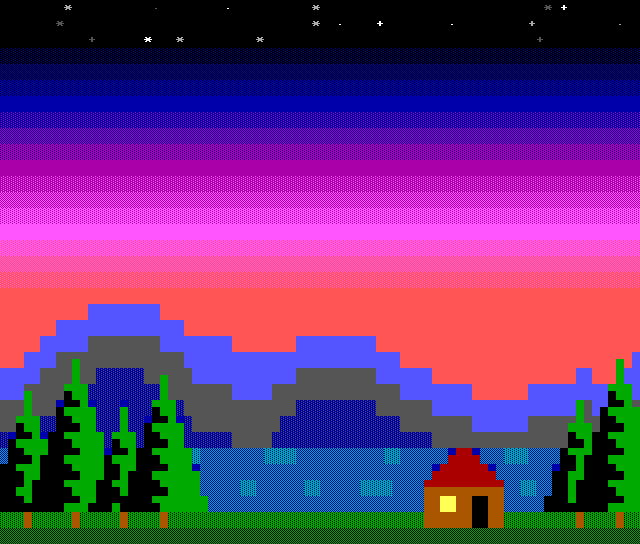
Ridges at dusk as it opens, with the ridges layer at its defaults:
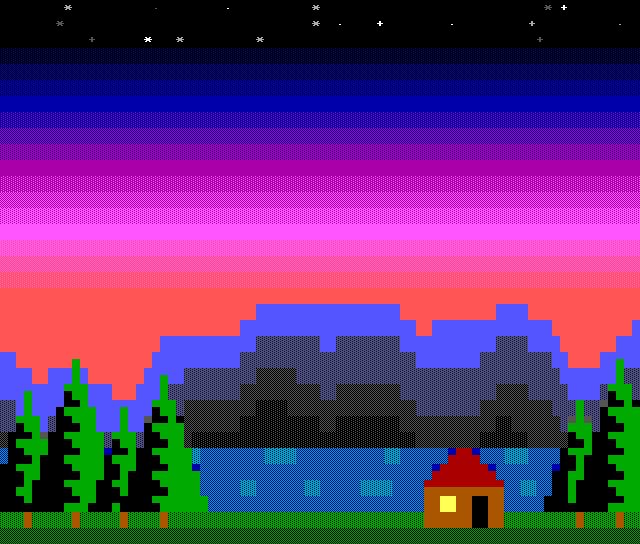
The sample's hidden ridges (seed 12) layer is the same generator with seed 12, four ridges and Sharp peaks on; its Another seed variant shows it in place of ridges:
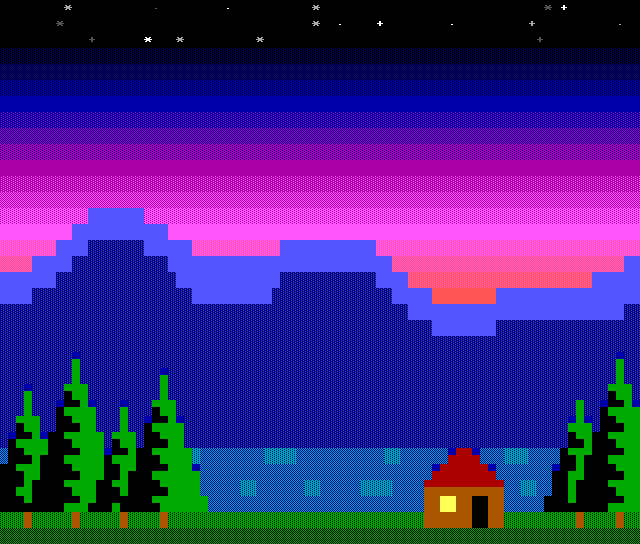
The ridges layer at Ridges 2, Roughness 0 and Highest row 12, seed 3:
The form
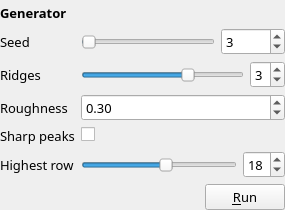
When the active layer is a Generator layer, its form is under the buttons in the Layers dock, titled Generator: one field for each parameter the generator declares, labelled with its label (or its name), then Run. Each field's tooltip is the parameter's name and type, such as seed (integer).
| Type | Field |
|---|---|
integer with a minimum and a maximum |
A slider and a spin box |
integer without both |
A spin box |
number |
A spin box with as many decimals as its step, minimum, maximum, default and value need; without a step, at least 3 |
boolean |
A tick box |
colour |
A list of the 16 colours, each with its swatch and number: 0 Black to 15 White |
ramp |
A list of the named ramps, each with its swatch |
text |
A line of text |
A field commits when it is let go or stepped: a slider released, a spin box stepped, a box ticked or cleared, an entry picked, or a typed value ended with Enter or by leaving the field. Each commit is one undo step (Generator Parameter), and the generator runs again 300 ms after the last one. Run (tooltip: Run the generator again with these parameters) runs it as it is, without changing a parameter. If the generator's files can't be read, the form says why in place of the fields.
Running
A generator runs only when you ask: a committed field, or Run. Opening, saving and exporting run nothing, so a project with generator layers opens and exports the same on a computer that doesn't have the programs.
The first time a project's generators would run in a session, Blockwright asks. The dialog is Run Generators, with the question Run the generators in and the project's path (this document for one not saved yet), and the text:
A generator is a program the project names, run on this computer with your permissions. Run them only if you trust where the project came from.
This one runs: sh ridges.sh
No is the default. A yes holds for that project until Blockwright closes, including when it is opened again. A no runs nothing, and the status bar says Generator not run: this project's generators are not trusted; the layer keeps its cells; the next run asks again.
While it runs, the status bar says Running generator..., and the window stays free to use. Then:
- Ran generator ridges when the run worked. The new cells replace the layer's in the same undo step as the parameter; a Run with no parameter changed is its own undo step (Run Generator), and none at all when the cells come out the same.
- Generator ridges failed; the layer keeps its cells: and the reason, when it didn't. The reasons are in Writing a generator.
Undo and redo put back the parameters and the cells together, and run nothing.
Seeds
A seed is a parameter like any other: Blockwright has none of its own. The samples' generators each declare a Seed and draw their random numbers from it, so the same parameters draw the same cells each time. A generator that reads the clock or the system's random numbers draws something new on each run.
Baking
Layer > Bake Layer (no shortcut) with a Generator layer active turns it into a Cells layer of the cells its last run left. The layer keeps its name, offset, visibility, mode and locks; a hidden or locked Generator layer bakes too. Its form is gone and its cells can be painted. The bake is one undo step, Edit > Undo Bake Generator, and undoing it brings back the Generator layer with its form and parameters. The generator's directory stays in the project, under scripts/<id>/, unused, so the undo has it to go back to.
To keep the generator as well, copy its cells onto a Cells layer instead: Selection > Select All, Edit > Copy, Layer > New Cells Layer, and Edit > Paste at cell 0, 0 (tutorial 12's Bake the ridges). Outside the window, blockwright-cli import-scene --bake writes each scene layer as the cells it made (CLI). Ridges at dusk keeps a hidden ridges (baked) layer, a Cells layer with the ridges cells and no program behind it; its Baked variant shows it.
Opening a scene
File > Open Scene... opens a Python scene (Python scenes (*.py)) as a new project, with a Generator layer for each layer the scene lists. It asks first, in the same Run Generators dialog: Run the scene and its path, with the text:
Opening a scene runs it, a Python program, on this computer with your permissions, once for its layers and once for each layer's cells; the project's layers run it again. Run it only if you trust where it came from.
and the command it will run. A progress dialog, Open Scene, says Listing the scene's layers... and then Running layer N of M (name)... for each layer, with its number, the count and its name. If anything goes wrong it says Could not open and the file's path, and why. A scene can't be opened while a generator is running: A generator is running; open the scene when it ends. The scene runs with python3 (on Windows, the first Python 3 it finds), as import-scene runs it (CLI).
Writing a generator
A generator is a directory kept in the project under scripts/<id>/, where <id> is the layer's id (Projects). It holds generator.json, an optional params.json, and the program's own files. The ridges generator's generator.json:
{
  "command": ["sh", "ridges.sh"],
  "key": 0,
  "params": [
    {"name": "seed", "type": "integer", "label": "Seed", "min": 0, "max": 99999, "default": 3},
    {"name": "ridges", "type": "integer", "label": "Ridges", "min": 1, "max": 4, "default": 3},
    {"name": "roughness", "type": "number", "label": "Roughness", "min": 0, "max": 1, "step": 0.05, "default": 0.3},
    {"name": "sharp", "type": "boolean", "label": "Sharp peaks"},
    {"name": "top", "type": "integer", "label": "Highest row", "min": 0, "max": 33, "default": 18}
  ]
}
| Key | What it holds |
|---|---|
command |
The program and its arguments, each a non-empty string. A bare name such as sh or python3 is looked up on the PATH; a path such as ./ridges is a file in the generator's directory; an absolute path is used as it is. |
key |
Optional: a colour, 0 to 15. A blank, non-blinking cell on that background in the output is transparent. Without it every cell is opaque. |
params |
The parameters the form shows, in order. |
Each parameter has a name (unique) and a type, integer, number, boolean, colour, ramp or text, and may have a label, a default, and for integer and number a min and max; a number may have a step above 0. An integer is a whole number from -2147483648 to 2147483647; a number runs from -1e12 to 1e12 with at most six decimals. A colour is 0 to 15, and a ramp is a ramp's name. Without a default, an integer or number starts at its minimum, or at 0 when it has none (at its maximum when that is below 0); a boolean starts off, a colour at light grey (7), a ramp at the first named ramp, and text empty.
params.json holds the values, one key a name, and the form writes it. A value missing from it, or one the parameter can't take, shows as the default.
What the program reads and writes
The program runs in a fresh temporary directory holding a copy of the generator's directory, and reads one line of JSON on its standard input:
{"canvas":{"height":34,"ice":true,"width":80},"layer":{"height":34,"id":3,"name":"ridges","width":80,"x":0,"y":0},"params":{"ridges":3,"roughness":0.3,"seed":3,"sharp":false,"top":18}}
params holds every declared parameter, with its default where params.json lacks it. The program writes an .ans to its standard output, read as CP437 at the layer's width (or the width its SAUCE gives), and exits with status 0. The output becomes the layer's cells, with the key colour's blank cells made transparent.
A run fails, and the layer keeps its cells, when the program:
- can't start: layer 3 (ridges): could not run ./ridges: No such file or directory;
- exits with another status: layer 3 (ridges): sh exited with status 1, followed by the end of what it wrote to its standard error, where a file in the temporary directory reads
./nameand the directory itself<generator dir>; - crashes: … crashed;
- runs longer than 30 seconds: … took longer than 30000 ms; stopped;
- writes more than 32 MiB: … wrote more than 33554432 bytes; stopped;
- writes something that isn't an
.ans: the output is not an .ans: ….
A generator.json that can't be read is named with its fault, such as generator.json: parameter "a": "type" is not one of integer, number, boolean, colour, ramp, text or "key" is not a palette colour, a whole number from 0 to 15.
How it is saved
A project keeps each Generator layer's cells, the last output, as it keeps a Cells layer's, and its generator's directory under scripts/<id>/, byte for byte. Saving and opening don't run it, and an export writes the cells as they are.
Limits
- Programs, not built-ins. Each generator is a program the project names, run with your permissions. Open a project's generators only if you trust where it came from.
- What the computer has. A generator runs only where its program does:
shandawk,python3, or whatever it names. On a computer without them, a run fails and the layer keeps its cells. - Not paintable. Painting tools and typing don't change a Generator layer's cells (Layers); bake it, or a copy of it, to paint on them (Baking).
- One at a time. A generator runs on its own thread, one run at a time; a commit made while one runs waits for it.
Describes Blockwright 0.1.0 (12ee9ef).