File formats: .ans, SAUCE, IRC text, UTF-8, XBIN, project files
Blockwright keeps a piece in one of four files: an ANSI file (.ans) with its SAUCE record, an XBIN (.xb), a BIN (.bin), or a Blockwright project (.bwp, or a project directory). It writes IRC text (.txt), Micron pages (.mu) and PNG pictures, and reads no other art format; the other files it reads are listed in Other files Blockwright reads. A project holds everything the editor has; each of the others holds less, and the editor says what before it writes one.
| Format | Read | Write | Holds |
|---|---|---|---|
Project, .bwp or a directory |
Yes | Yes | Everything: layers, any glyph, mIRC's colours, bold, italic and underline, the target, the IRC budget, notes, snapshots, SAUCE |
ANSI, .ans |
Yes | Yes | One flat canvas of CP437 glyphs, or any glyph in a UTF-8 .ans, in the 16 colours, iCE or blink, SAUCE |
XBIN, .xb |
Yes | Yes | One flat canvas, its own palette and font, iCE, SAUCE without its flags |
BIN, .bin |
Yes | Yes | One flat canvas an even number of columns wide, iCE, SAUCE |
IRC text, .txt |
No | Yes | The rows as IRC lines, in mIRC colours |
Micron page, .mu |
No | Yes | The rows as a NomadNet page, in the document's colours, bold, italic and underline |
| PNG | No | Yes, with blockwright-cli render |
A picture |
Opening a file
File > Open... lists Blockwright projects and ANSI art (*.bwp *.ans *.xb *.bin), Blockwright projects (*.bwp), ANSI art (*.ans), ANSI art, CP437 (*.ans), ANSI art, UTF-8 (*.ans), XBIN (*.xb), BIN (*.bin) and All files (*). The CP437 and UTF-8 filters read an .ans in that encoding; the others read it as its bytes say (UTF-8 ANSI). File > Open Project Directory... opens a project saved as a directory. File > Open Recent lists the files opened lately.
What a file is read as:
- A directory holding a
manifest.json, or a file that starts as a zip does (PK0x03 0x04), is a project, whatever its name. So is any file named.bwp. - A file that starts with the XBIN magic (
XBINand 0x1A) is an XBIN, whatever its name. - Otherwise the name decides, in any case:
.xbor.xbinis XBIN,.binis BIN, and anything else is read as ANSI, in CP437 or UTF-8 (UTF-8 ANSI).
A file that can't be read says why: "Could not open …" and the reason. blockwright-cli reads the same files the same way (by content, then name; it doesn't go by .bwp; --encoding says how to read an .ans), and a project as its visible layers merged.
Saving
File > Save writes the document's own file. File > Save As... offers ANSI art (*.ans), ANSI art, UTF-8 (*.ans), Blockwright project (*.bwp), XBIN (*.xb), BIN (*.bin) and All files (*), starting on the document's own kind (for an .ans, the one for its encoding); a name typed without an extension gets the chosen filter's. The extension then picks the format: .bwp is a project, .xb or .xbin XBIN, .bin BIN, and anything else ANSI. File > Save As Project Directory... saves the document as a project directory instead; it asks before replacing a directory that already holds a project, and refuses one that holds anything else. On a project directory the two swap: Save As... picks another directory, and the second item reads Save As File....
When the file can't hold something the document has, a warning lists what is lost before anything is written, under "Before saving as .ans:", "Before saving as XBIN:", "Before saving as BIN:" or "Before saving the project:":
| Line | When |
|---|---|
| N cell(s) hold a glyph with no CP437 code and will be written as '?': … | A CP437 .ans, XBIN or BIN, and a glyph CP437 doesn't have; the glyphs are named with where they are, such as ★ at 0,0 |
| N cell(s) hold glyphs CP437 can't hold whole: … | A CP437 .ans, XBIN or BIN, and a wide glyph or a glyph with combining marks, each named with what it is written as |
| N cell(s) hold a glyph whose CP437 byte .ans reads as a control code (…) and will be written as '?' (XBIN and BIN keep them) | A CP437 .ans, and a glyph whose byte the reader would act on (see Writing) |
| N cell(s) hold control characters a UTF-8 .ans can't hold and will be written as '?': … | A UTF-8 .ans, and a control character in a cell; other lines name a wide glyph or a zero-width glyph a terminal wouldn't draw in its cells |
| N cell(s) lost their blink when the file was opened with iCE colours, and this save doesn't put it back | See iCE colours and blink |
| the file's own palette is left out (only XBIN keeps one) | Anything but XBIN, from an XBIN with its own palette |
| the file's own font is left out (only XBIN keeps one) | Anything but XBIN, from an XBIN with its own font |
| the 9 px letter spacing is left out (XBIN has none and draws 8 px) | XBIN, with 9 px letter spacing on |
| the legacy aspect ratio is left out (XBIN has none) | XBIN, with SAUCE's aspect ratio set; a square one says square |
| the SAUCE font name … is left out (XBIN names no font) | XBIN, with a SAUCE font name other than IBM VGA or IBM VGA 437 |
| N cell(s) are in colours the file can't hold, saved as the nearest of the 16 | An .ans, XBIN or BIN, and a cell in a colour past the 16, such as one of mIRC's (Palette, iCE colours and 24-bit colour) |
| N cell(s) have bold, italic or underline, which the file can't hold | An .ans, XBIN or BIN, and a cell with bold, italic or underline |
When a CP437 .ans would lose glyphs that a UTF-8 one keeps, a paragraph after the list says so, such as A UTF-8 .ans keeps all 3 of those glyphs: Save As and choose "ANSI art, UTF-8 (*.ans)". The question ends "Save anyway?".
Save writes it anyway; Cancel writes nothing. Then the status bar says "Saved …", or one of the messages in Saving a project as a flat file. An .ans, XBIN or BIN is written beside its destination and renamed over it, so a save that fails leaves the old file as it was; a message says "Could not save …" and why. A flat file is never written over a project: "… is a project; save it as a project or choose another name".
blockwright-cli convert and pack warn of the same losses, in their own words, and write nothing without --allow-lossy (see From the command line).
ANSI (.ans) and SAUCE
An .ans is CP437 text with ANSI escape codes for colour and cursor movement, and usually a SAUCE record at the end: 128 bytes after a 0x1A that give the piece's size, title, author, group, date, font and flags, with an optional block of comments before it.
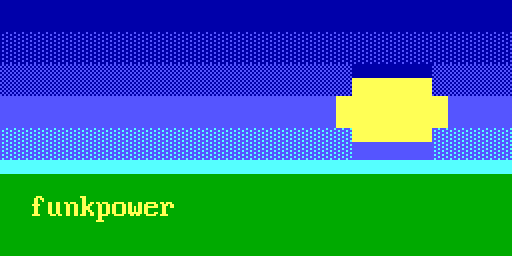
$ blockwright-cli info piece.ans
file:        piece.ans
encoding:    CP437
size:        32x8
ice:         on
sauce:       yes
title:       A sun over a field
author:      funkpower
group:
date:        20261102
filesize:    496 (matches content)
datatype:    1
filetype:    1
tinfo:       32 8 0 0
flags:       0x1 (iCE on, letter spacing not set, aspect not set)
font:        IBM VGA
comments:    0
Reading
- The width is SAUCE's TInfo1 when the record says Character (DataType 1) and TInfo1 isn't 0; otherwise it is 80, with SAUCE or without. The height is the last row anything is drawn on, or, for a Character record, its TInfo2 if that is taller. A width outside 1-400 columns is refused, and so is a file that draws below row 5000.
- Colours set with 256-colour or 24-bit codes (
38;5;n,38;2;r;g;b, PabloDraw'sCSI t) are taken to the nearest of the 16 palette colours. - The glyphs are CP437 bytes, or UTF-8 (UTF-8 ANSI).
- iCE colours come from the flags of a Character record, and are on for a file without one.
- The art ends at the first 0x1A before the record. SAUCE's FileSize is read (and
infosays whether it matches) but never used to cut the art, so a file whose FileSize is 0 or wrong still loads.
Writing
The writer writes:
ESC[0mfirst; then each row with its trailing black spaces left off, a full colour code (0;then1;for a bright foreground,5;for a bright background or blink,3x;4x) whenever the colours change, andESC[0mat the end, then CR LF, except on a row drawn to the canvas's full width, which wraps on its own and gets no CR LF. An empty row is one space.- Then SAUCE: the document's own record, or a new one dated today in
IBM VGA. Either way it is written as Character,ANSi(DataType 1, FileType 1), with its width, height, FileSize and iCE flag set from the document, so a document with iCE colours off gets a new record with iCE off. - In a CP437
.ans, a glyph with no CP437 byte, or whose byte is one the reader would act on (TAB, LF, CR, SUB, ESC), is written as?, and a wide glyph as?and a space. NUL is written as a space. A UTF-8.answrites the glyphs as UTF-8 (UTF-8 ANSI). - A colour past the 16 is written as the nearest of them, and bold, italic and underline are left out.
So saving a file Blockwright didn't write rewrites it in this form: the same cells, different bytes.
SAUCE fields
File > SAUCE... edits the record:
| Field | Limit |
|---|---|
| Title | 35 characters |
| Author | 20 characters |
| Group | 20 characters |
| Date | Empty or CCYYMMDD; Today fills it in |
| Comments | Up to 255 lines of 64 characters |
Title, author and group refuse a character CP437 doesn't have, and text past the limit, as it is typed or pasted. While the date or the comments are wrong, the dialog says why under the fields ("The date must be empty or a date written CCYYMMDD.", "Comment line 3 is 70 characters; the limit is 64.") and OK stays greyed out. A field left as it came from the file isn't checked, so a malformed date in the record doesn't stop the rest being edited.
Two flags are set from the View menu, as they change how the piece looks:
| View menu item | SAUCE flag |
|---|---|
| iCE Colours | iCE colours (bit 0): bright backgrounds as 16 colours; off, they blink on the dark colour |
| 9 px Letter Spacing | Letter spacing 9 px (bits 1-2): 9 px cells, the line-drawing glyphs 0xC0-0xDF joined as on VGA; off, 8 px |
The aspect flag (bits 3-4) and the font name are kept as read.
iCE colours and blink
The colour code's bit for a bright background is also the bit for blink. With iCE colours on it gives the 16 background colours; off, the background has only the 8 dark ones and the bit makes the cell blink. Blockwright keeps a cell as it was drawn and shows and saves it through the setting, so turning iCE colours off doesn't change a cell: it changes how it shows.
The same cells saved with iCE colours off: the two lower rows of sky, light blue above, are blue, and their cells blink (drawn here in the phase that shows the glyph).
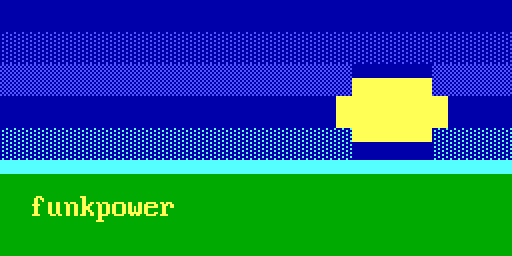
$ blockwright-cli info blink.ans
…
ice:         off
…
flags:       0x0 (iCE off, letter spacing not set, aspect not set)
…
A file can't have both. When a file with iCE colours off holds a bright background anyway (a 24-bit colour, or ESC[10xm), the editor opens it with iCE colours on, as it would have to save it, and its blinking cells lose their blink. This one has nine blinking letters and two cells of bright blue background:

$ blockwright-cli convert mixed.ans out.ans
blockwright-cli: warning: mixed.ans: 9 blinking cells lose their blink: bright backgrounds need iCE colours, where blink is a bright background
blockwright-cli: out.ans: not written: the conversion loses data (--allow-lossy writes it anyway)
Converting to XBIN or BIN says the same. In the editor the loss happens when the file is opened, and every save that still writes those cells without their blink lists them ("cell(s) lost their blink when the file was opened with iCE colours"). A blank glyph is never counted: blink on a space shows nothing.
XBIN (.xb)
An XBIN is an 11-byte header (the width, the height, the font's height and flags), then optionally a palette and a font, then the cells as character and attribute pairs, optionally compressed in runs. Blockwright reads it compressed or not, and refuses one with a 512-character font (its second 256 glyphs have no CP437 byte), a font height outside 1-32, a palette or font cut short, or a size of 0 or over 400 × 5000.
- iCE colours are the header's non-blink flag.
- A palette is 16 colours of 6-bit RGB and a font 256 glyphs 8 pixels wide. Both are kept on the document and written back by an XBIN save. Nothing draws with them yet: the canvas and the PNGs use the standard palette and the bundled IBM VGA font. Saving to anything but XBIN leaves them out, and says so.
- SAUCE, if any, follows the cells.
The writer compresses each row on its own in the fewest bytes, and writes SAUCE as XBin (DataType 6, FileType 0): with the title, author, group, date and comments, but with its flags and font name cleared. The iCE setting is kept, in the header. 9 px letter spacing, the aspect flag and a font name other than IBM VGA or IBM VGA 437 are lost: saving warns, and convert writes the file only with --allow-lossy.
$ blockwright-cli convert piece.ans piece.xb
$ blockwright-cli info piece.xb
file:        piece.xb
format:      XBIN, compressed
palette:     none
font:        none
size:        32x8
ice:         on
sauce:       yes
title:       A sun over a field
author:      funkpower
group:
date:        20261102
filesize:    67 (matches content)
datatype:    6
filetype:    0
tinfo:       32 8 0 0
flags:       0x0 (iCE off, letter spacing not set, aspect not set)
font:
comments:    0
The ice line is the header's; the SAUCE flags are 0. The art's 496 bytes are 67 as XBIN; with SAUCE, the files are 625 and 196 bytes.
palette.xb is an 8 × 2 XBIN with its own palette, a ramp of greens, and no SAUCE:
$ blockwright-cli info palette.xb
file:        palette.xb
format:      XBIN
palette:     custom
font:        none
size:        8x2
ice:         off
sauce:       none
$ blockwright-cli convert palette.xb palette.ans
blockwright-cli: warning: palette.xb: its palette is left out: only XBIN holds one
blockwright-cli: palette.ans: not written: the conversion loses data (--allow-lossy writes it anyway)
A palette the same as the standard one isn't counted as lost.
BIN (.bin)
A BIN is the cells alone, character and attribute pairs, row after row, with SAUCE after them. With no header, the width comes from SAUCE: FileType × 2 when SAUCE says BinaryText (DataType 5), with iCE colours from its flags. Without such a record the width is 160 and iCE colours are on. The rows are as many as the pairs fill, the last one padded with blank cells.
The writer writes SAUCE as BinaryText (DataType 5, FileType the width / 2, TInfo1-4 0), keeping the flags (iCE set to the document's) and the font name. A BIN is an even number of columns wide, so an odd width gains a blank column on the right. It can't hold a palette or a font.
$ blockwright-cli convert piece.ans piece.bin
$ blockwright-cli info piece.bin
…
format:      BIN
…
filesize:    512 (matches content)
datatype:    5
filetype:    16
tinfo:       0 0 0 0
flags:       0x1 (iCE on, letter spacing not set, aspect not set)
font:        IBM VGA
…
XBIN and BIN write a glyph with a CP437 byte as that byte, NUL and control codes included, one without as ?, and a wide glyph as ? and a space.
Projects (.bwp)
A project is the whole document: its layers, the IRC budget, notes, snapshots, SAUCE, and any files kept with it. It is saved as one zip file, .bwp, or as a directory of the same files, which suits version control and scripts.
manifest.json       format, version, size, palette, iCE, target, .ans encoding, IRC budget, SAUCE, layer order, next layer id
layers/<id>.json    the layer's properties
layers/<id>.cells   its cells (a versioned header, then zstd)
fonts/<sha256>.tdf  a TheDraw font a text layer is set in, named by the sha256 of its bytes
notes.md            notes; absent when empty
snapshots/r<N>.ans  snapshots, each the visible layers flattened to an .ans in the project's encoding
refs/<sha256>.png   a reference layer's picture, .png or .jpg, named by the sha256 of its bytes (from version 1.5)
scripts/<id>/, thumbnail.png and anything else
The manifest has "target": "irc" for a project under the IRC target and "ansEncoding": "utf-8" for one that saves a UTF-8 .ans; neither key is there otherwise. A reference layer names its picture in its "reference" key, with the picture's place, size and opacity; the reader refuses a picture whose bytes don't hash to its name.
blockwright-cli unpack writes a piece as a project directory. For the sun piece:
$ blockwright-cli unpack piece.ans piece/
$ find piece -type f | sort
piece/layers/1.cells
piece/layers/1.json
piece/manifest.json
$ cat piece/manifest.json
{
    "format": "blockwright",
    "height": 8,
    "ice": true,
    "ircBudget": {
        "bytes": 407,
        "profile": "efnet-weechat"
    },
    "layers": [
        1
    ],
    "nextLayerId": 2,
    "palette": "cga",
    "sauce": {
        "aspectRatio": "none",
        "author": "funkpower",
        "comments": [
        ],
        "date": "20261102",
        "font": "IBM VGA",
        "group": "",
        "letterSpacing": null,
        "reservedFlags": 0,
        "tinfo3": 0,
        "tinfo4": 0,
        "title": "A sun over a field"
    },
    "version": "1.3",
    "width": 32
}
pack writes the zip, and info reads either:
$ blockwright-cli pack piece.ans piece.bwp
$ blockwright-cli info piece.bwp
file:        piece.bwp
project:     zip
size:        32x8
ice:         on
encoding:    CP437
target:      ansi
irc budget:  407 bytes (efnet-weechat)
layers:      1 (next id 2)
  1  cells  32x8 at 0,0  normal  visible yes, locked no, alpha locked no  Background
notes:       0 bytes
snapshots:   0
files:       0
sauce:       yes
title:       A sun over a field
author:      funkpower
group:
date:        20261102
letter spacing: not set
aspect:      not set
font:        IBM VGA
comments:    0
Versions. The version is major.minor; the sun piece's is 1.3. A newer feature that an older reader can drop without changing what the project shows raises the minor version; one it would show wrongly, such as a style on a cells or pixels layer (drawn only when the layers are merged), raises the major version: a layer with a wide glyph or a cluster makes a project 4.0, and a cell with bold, italic or underline makes it 5.0. A reader refuses a major version it doesn't know rather than lose what it can't read. Within a major version it skips the keys it doesn't know, and keeps the files it doesn't know and saves them back.
A project holds any glyph, not only CP437, mIRC's colours, bold, italic and underline, the target and the IRC budget. It doesn't hold an XBIN's palette or font: packing an XBIN that has one refuses without --allow-lossy, and Save warns.
Saving a project as a flat file
An .ans, XBIN or BIN holds one flat canvas, so saving a project as one writes its visible layers merged. What happens to the document depends on what it holds:
| The document | After saving as .ans, .xb or .bin |
Status bar |
|---|---|---|
| One plain cells layer the size of the canvas, at 0,0, visible, normal, unstyled, with no notes, snapshots or files, the budget unchanged and the ANSI target | The flat file becomes the document's file | Saved … |
| A project with more than that | The file is an export; the document is still the project | Exported … flattened; the document is still … |
| A flat file with more than that (a layer added, say) | The file is written, but the document stays modified, since the file doesn't hold it all | Saved … flattened; only a project keeps the layers |
Closing such a flat document asks first, saying that only a project saves its layers and IRC budget.
File > Take Snapshot keeps the visible layers, flattened to an .ans, as the project's next snapshots/r<N>.ans, in the document's encoding; the status bar says "Took snapshot rN; saving the project keeps it". If the .ans would lose anything it asks first ("Snapshot rN, as .ans:" and the same lines as Save). On a flat document the item is greyed out: save it as a project first.
IRC text (.txt)
File > Export IRC Text... and blockwright-cli export --irc write the canvas as IRC text: UTF-8, one line per row, each ended by a line feed, colours as mIRC colour codes. It is written, never read. IRC covers the encoding, the byte budget and the options.
Micron page (.mu)
File > Export Micron... (no shortcut) and blockwright-cli export --micron write the canvas as a Micron page, the markup NomadNet shows its pages in. It is written, never read. The file is UTF-8, one line per row, each ended by a line feed.
- Any tool's edit in progress lands first. A floating selection that can't land stops the export, and the status bar says "Not exported: the floating selection can't land: …" for five seconds.
- If any cell would be written as something else (see What a page doesn't keep), a warning starts "Before exporting a Micron page:", lists them, and asks "Export anyway?". Save goes on, Cancel, the default, stops.
- A dialog, Export Micron, offers Centre the piece on the page and Write a page cache header, seconds: and a number from 0 to 31536000, greyed out until that box is ticked. Both boxes start unticked each time, and the number at 0.
- A file dialog asks where, starting (for a document with a file) at its name with
.muin its folder, filtered toMicron pages (*.mu)orAll files (*). - The file is written, and the status bar says "Exported a Micron page to …" for three seconds. If it can't be written, a message says "Could not write …" and why.
What a page holds
- The cells as the editor shows them: the visible layers merged, under the document's iCE setting. A colour of the 16 is written in the document's palette: the standard one, or an XBIN's own where it has one, which the canvas doesn't draw with yet; any other colour, such as one of mIRC's 99 colours, is written as its exact RGB.
- A colour as
`F(foreground) or`B(background) and three hex digits when each of its channels is one digit doubled, as each of the 16 is (#aa5500isa50), else asTand six digits (`FT001008). - A colour only where it changes and only where the cell shows it: no foreground for a space unless it is underlined, and no background behind a
█unless it is italic, which slants it off its cell. - Bold, italic and underline as
`!,`*and`_, each turned on and off where it changes. `and\with a\in front, and!after#too, as NomadNet reads#!bg=and#!fg=anywhere in a page as page headers.- Every row, blank rows included, and every column, trailing blanks included, so the lines are all the canvas's width. Each line starts with its colours and ends with
``, which resets them.
The sun piece starts:
$ blockwright-cli export --micron piece.ans piece.mu
8 lines, 32 columns
$ head -3 piece.mu
`B00a                                ``
`F55f`B00a░░░░░░░░░░░░░░░░░░░░░░░░░░░░░░░░``
`F55f`B00a▒▒▒▒▒▒▒▒▒▒▒▒▒▒▒▒▒▒▒▒▒▒`Fff5▄▄▄▄▄`F55f▒▒▒▒▒``
palette.xb is written in its own palette, and the CLI says so: "2 lines, 8 columns, own palette". Its first line is `F000█`FT001008█`FT002010█`FT003018█`FT004120█`FT005128█`FT006130█`FT007138█``.
No #!bg= or #!fg= header is written: each line sets its own colours.
Centre and the cache header
Centre the piece on the page (--centre) starts each line with `c, NomadNet's centre alignment. A centred line ends by turning off any bold, italic or underline still on and then `f`b instead of ``, since `` would reset the alignment too, and NomadNet aligns a line as it stands at its end. As every line is the canvas's width, the rows stay in line.
Write a page cache header (--cache S) writes #!c=S as the page's first line, the seconds a peer may keep the page; 0 says never to cache it. NomadNet reads the header only on a page's first line.
$ blockwright-cli export --micron --centre --cache 3600 piece.ans piece.mu
8 lines, 32 columns, centred
$ head -3 piece.mu
#!c=3600
`c`B00a                                `f`b
`c`F55f`B00a░░░░░░░░░░░░░░░░░░░░░░░░░░░░░░░░`f`b
What a page doesn't keep
- Blink. It isn't written; a blink cell in a document without iCE colours is written on its dark background.
- Some glyphs. They are written as IRC text writes them (How a row is encoded): a control code as its CP437 glyph, NUL as a space, and a C1 control, U+2028, U+2029 or a code point that isn't a Unicode scalar value as
?. A glyph holding a code point NomadNet drops from a page is written as?too, a wide one as?and a space, so the columns stay: combining marks, format characters such as zero-width spaces, joiners and bidi controls, variation selectors, the emoji skin-tone modifiers, and☝, which NomadNet draws as a space. So an accented letter made of a letter and a combining mark,eand U+0301, is written as?. - Layers, SAUCE, the target, the IRC budget, notes, snapshots and files.
The glyphs written as ? are the ones the warning lists. blockwright-cli prints them as warnings and writes the file anyway: blockwright-cli: warning: t.ans: 3 cells hold code points NomadNet drops from a page and are written as '?' (first: U+0065 U+0301 'e U+0301' at column 2, row 1). See export --micron for the options.
UTF-8 ANSI
A UTF-8 .ans is an .ans with its glyphs as UTF-8 rather than CP437 bytes, as a terminal draws them. It holds any glyph: one drawn two columns wide, such as 日, takes two cells, and a glyph with combining marks stays in one. The escape codes are the same. SAUCE stays CP437, and its FileSize counts the UTF-8 bytes.
An .ans is read as UTF-8 when it starts with a byte order mark, or when it is all well-formed UTF-8 with at least one sequence of three bytes or more (each block, shade and box glyph is three bytes); anything else is read as CP437. So a UTF-8 █ (0xE2 0x96 0x88) reads as █, and a CP437 file whose bytes happen to make two-byte UTF-8 still reads as CP437. The status bar shows the encoding, CP437 or UTF-8. To read a file the other way, open it with the ANSI art, CP437 (*.ans) or ANSI art, UTF-8 (*.ans) filter, or use File > Reopen with Encoding (Auto (as its bytes say), CP437 or UTF-8, no shortcuts), which asks to save unsaved edits first and is greyed out unless the document is an .ans file.
File > Save writes an .ans in the encoding the document was opened or last saved in. A new document is CP437 under the ANSI target and UTF-8 under the IRC target. Save As... with ANSI art (*.ans) writes CP437, and with ANSI art, UTF-8 (*.ans) UTF-8. A UTF-8 .ans gets a byte order mark only when it has no sequence of three bytes or more, so that it reads back as UTF-8. File > Publish to Library... and File > Send to WeeChat... write their .ans in CP437, as WeeChat's ascii script reads only CP437.
blockwright-cli reads an .ans the same way, or as --encoding cp437 or --encoding utf-8 says. convert writes CP437 unless given --output-encoding utf-8; the sun piece is 883 bytes that way. An XBIN or BIN is CP437 only, so --output-encoding utf-8 with an <out> named .xb or .bin is refused, exit status 2: blockwright-cli: --output-encoding utf-8 writes an .ans; piece.xb is XBIN or BIN, which are CP437.
Other files Blockwright reads
Besides the art formats above, these are read:
| File | Read by |
|---|---|
| PNG and JPEG pictures | File > Open Reference Image... (Images (*.png *.jpg *.jpeg)), as a reference layer; a project keeps the picture under refs/ |
Python scenes (.py) |
File > Open Scene... and blockwright-cli import-scene, which run the scene and open it as a project with a generator layer for each of its layers |
A generator's directory (generator.json, and params.json and scripts) |
blockwright-cli add-generator |
TheDraw fonts (.tdf) |
The fonts folder set in Preferences, for text layers, and a text step in a blockwright-cli replay steps file (A TheDraw font); a project keeps the fonts its text layers use under fonts/ |
Library stamps (an .ans and its .json sidecar) and text styles (.style.json) |
The Library, from the bundled library and the user's; blockwright-cli library list and library check |
The ascii library's .tags.json and .dates.json |
File > Publish to Library..., which reads and rewrites them |
What each format keeps
| Project | .ans |
XBIN | BIN | |
|---|---|---|---|---|
| Layers | Yes | Merged | Merged | Merged |
| Glyphs with no CP437 code | Yes | ? (CP437), Yes (UTF-8) |
? |
? |
| mIRC's colours past 15 | Yes | The nearest of the 16 | The nearest of the 16 | The nearest of the 16 |
| Bold, italic, underline | Yes | No | No | No |
| iCE colours | Yes | Yes | Yes (header) | Yes |
| An XBIN's palette and font | No | No | Yes | No |
| SAUCE title, author, group, date, comments | Yes | Yes | Yes | Yes |
| SAUCE letter spacing and aspect | Yes | Yes | No | Yes |
| SAUCE font name | Yes | Yes | No; a warning unless it is IBM VGA or IBM VGA 437 |
Yes |
| Odd width | Yes | Yes | Yes | A blank column added |
| Target, IRC budget, notes, snapshots, files | Yes | No | No | No |
From the command line
blockwright-cli convert [--allow-lossy] [--encoding auto|cp437|utf-8] [--output-encoding cp437|utf-8] <in> <out>
blockwright-cli pack [--allow-lossy] [--encoding auto|cp437|utf-8] [--target ansi|irc] <in> <out.bwp>
blockwright-cli unpack [--allow-lossy] [--encoding auto|cp437|utf-8] [--target ansi|irc] <in> <dir>
convert reads any piece and writes the format <out>'s name gives: XBIN for .xb or .xbin, BIN for .bin, and ANSI for any other name but .bwp, which it refuses with blockwright-cli: x.bwp: not written: convert writes .ans, .xb or .bin; use pack for a project, exit status 1. pack and unpack write a project, its target set by --target (default: a project's own, else ansi). A conversion that would lose something prints a warning for each loss and writes nothing, exit status 1, unless --allow-lossy is given; then it prints the warnings and writes the file:
$ blockwright-cli convert palette.xb palette.ans
blockwright-cli: warning: palette.xb: its palette is left out: only XBIN holds one
blockwright-cli: palette.ans: not written: the conversion loses data (--allow-lossy writes it anyway)
$ blockwright-cli pack palette.xb palette.bwp
blockwright-cli: warning: palette.xb: its palette is left out: only XBIN holds one
blockwright-cli: palette.bwp: not written: the project loses data (--allow-lossy writes it anyway)
convert reads a piece as the file has it, without the editor's change on open: a file whose blink is all it has keeps it. Lost blink is a loss when a bright background forces iCE colours on, as with mixed.ans above. pack warns of lost blink but writes the project anyway. See convert and pack, unpack and snapshot for the rest of their options.
Describes Blockwright 0.1.0 (12ee9ef).