blockwright-cli
blockwright-cli is Blockwright without the window. It converts, renders, exports, shades and lints pieces, packs and unpacks projects, and runs generator layers, so scripts can do what the editor does.
Tutorial 12, Scripts and generators, finishes a piece with replay, info, render, lint, export --irc and run-generators.
blockwright-cli [options] command [args...]
What it reads
Every command that reads a piece takes an ANSI file (.ans), an XBIN (.xb) or a BIN (.bin). It also takes a project, a .bwp zip or a project directory, and reads it as its flattened composite: the visible layers merged as the editor shows them. Commands that write a piece (convert, shade) write XBIN to an output named .xb, BIN to one named .bin, and ANSI otherwise. convert, shade, export --irc, export --micron and render refuse an output named .bwp (exit status 1): pack writes a project.
What a command reads must be a regular file, or for a project a directory. A FIFO (/dev/stdin from a pipe, or <(...)), a device, a socket or any other directory is refused, naming what it is, with exit status 1: blockwright-cli: in.ans: is a FIFO, not a regular file.
An .ans is read as UTF-8 when it starts with a byte order mark, or when it is all well-formed UTF-8 with a sequence of three bytes or more (the block and box glyphs terminals draw with); otherwise it is read as CP437. --encoding auto|cp437|utf-8 says which, for info, convert, render, export, shade, lint, pack and unpack; info prints the one it was read as.
convert, shade and replay write an .ans as CP437 unless --output-encoding utf-8 is given. The SAUCE record stays CP437, and a UTF-8 .ans starts with a byte order mark only when its text has no sequence of three bytes or more, so that a reader still takes it for UTF-8. snapshot writes the project's own encoding, or the one --output-encoding gives. XBIN and BIN are CP437, so --output-encoding utf-8 to an .xb or .bin output is a usage error. Everything else is written as CP437.
An option given to a command that doesn't take it is a usage error.
In a project format before 5.0 (the project's manifest.json gives the version), a cell's attributes hold only blink: bold, italic and underline came with 5.0. If any cell of a project in such a format has another attribute bit set, which no earlier build wrote, every command that reads the project clears those bits as it reads and says so on stderr, naming the file and the number of cells (1 cell when there is one):
blockwright-cli: note: old.bwp: cleared attribute bits no earlier build wrote from 2 cells
The command goes on as usual: its output on stdout and its exit status are the same as without the note. replay prints it for a project it starts from, after the steps file's name (blockwright-cli: note: steps.json: start: old.bwp: ...), and so does blockwright --screenshot (blockwright: note: steps.json: start: old.bwp: ...). A newer project with an attribute bit Blockwright doesn't know is refused instead (...: cell 0 has an unknown attribute, exit status 1).
Commands
info
blockwright-cli info <file>
Prints the piece's size and whether it uses iCE colours. For an .ans it prints the encoding it was read as (CP437 or UTF-8); for an XBIN, that it is one (and whether it is compressed), its palette (none, standard or custom) and its font; for a BIN, that it is one. Then the SAUCE record, or none: title, author, group, date, the file size it records and whether that matches the content, data type, file type, the four TInfo fields, the flags (iCE colours, letter spacing, aspect ratio), font and comments.
For a project it prints whether it is a zip or a directory, its size, iCE colours, encoding and target, the IRC byte budget, the layers (id, kind, size, position, mode, visibility and locks, name), the size of the notes in bytes, the snapshots, the files it carries, and its SAUCE title, author, group, date, letter spacing, aspect ratio, font and comments.
convert
blockwright-cli convert [--allow-lossy] [--output-encoding cp437|utf-8] <in> <out>
Reads a piece and writes it as ANSI, XBIN or BIN, chosen by <out>'s extension. <out> may be <in>: the file is rewritten in place, which normalises it. When something can't be represented in the output, nothing is written unless --allow-lossy is given. --output-encoding writes an .ans as CP437 (the default) or UTF-8 (see What it reads).
render
blockwright-cli render [--scale N] [--font-width 8|9] <in> <out.png>
blockwright-cli render --irc [--budget N] [--fit] [--pad] [--swap-shades] [--scale N] [--font-width 8|9] <in> <out.png>
Draws the piece as a PNG with the IBM VGA font.
| Option | What it does |
|---|---|
--scale N |
Integer zoom, nearest neighbour, 1 to 8 (default 1) |
--font-width 8|9 |
Glyph width in pixels (default: the SAUCE letter spacing, else 8) |
--irc |
Draw the IRC view instead: the mIRC palette, without what IRC drops, each line cut at the budget. Prints how many rows were cut, as IRC view: 0 rows cut at 407 bytes |
--budget N |
With --irc: the bytes a line may take, 1 to 512. Default: a project's own budget, else 407 |
--fit, --pad, --swap-shades |
With --irc: as for export --irc |
--budget, --fit, --pad and --swap-shades without --irc are usage errors.
render refuses to write over its input.
export --irc
blockwright-cli export --irc [--budget N] [--fit] [--pad] [--swap-shades] [--allow-over-budget] <in> <out>
Writes the piece as IRC text with mIRC colour codes, one line per row, and prints a table of each line's size in bytes, as written and as WeeChat's ascii script sends it (headed line bytes sent), then a summary:
50 lines, longest 350 bytes, 352 sent, budget 407: 0 over
| Option | What it does |
|---|---|
--budget N |
The bytes a line may take, 1 to 512. Default: a project's own budget, else 407 (EFnet through WeeChat) |
--fit |
Fit lines over the budget by merging their least visible colours, and report how many cells were merged in how many lines |
--pad |
Keep trailing black cells and blank rows at the top and bottom, ending each row on a black block |
--swap-shades |
Let the encoder draw a shade as its opposite with the colours reversed when that is shorter |
--allow-over-budget |
Write the file even when lines are over the budget |
A line over the budget, measured as WeeChat's ascii script sends it, is reported with how far over it is. Without --allow-over-budget the output isn't written and the exit status is 3. Cells IRC text can't hold, such as a control character, are written as ?, with a warning that counts them and names the first. export --irc refuses to write over its input.
export --micron
blockwright-cli export --micron [--centre] [--cache S] <in> <out.mu>
Writes the piece as a Micron page for NomadNet, as File > Export Micron... does (Micron page): the cells as the editor shows them, in the document's palette, one line per row. A flat file is read as the editor opens it, and a project as its visible layers merged, under its iCE setting. It prints the lines and columns written, and says when the page is centred or the piece has its own palette:
$ blockwright-cli export --micron --centre mixed.ans mixed.mu
1 line, 11 columns, centred
| Option | What it does |
|---|---|
--centre |
Centre the piece on the page: each line starts with `c |
--cache S |
Write the page header #!c=S as the first line, the seconds a peer may cache the page, 0 to 31536000; 0 says never cache it |
export takes one format, --irc or --micron; neither or both is a usage error ("blockwright-cli: export needs one format: --irc or --micron"), and so is the other format's option: "blockwright-cli: --fit is an export --irc option". Cells the page writes as ? are warned of, one warning for each kind, counting them and naming the first, and the file is still written, exit status 0. export --micron refuses to write over its input.
shade
blockwright-cli shade --ramp R [--darken] [--steps N] [--box x0,y0,x1,y1] [--mask <mask>] [--ice] [--allow-lossy] <in> <out>
blockwright-cli shade --form dome|cylinder|plane [--glint] --ramp R [--light P] (--box ... and/or --mask ...) <in> <out>
blockwright-cli shade --despeckle --ramp R (--box ... and/or --mask ...) <in> <out>
blockwright-cli shade --rim --ramp R [--light P] (--box ... and/or --mask ...) <in> <out>
Runs one pass of a shading brush over part of the piece. Without a mode it is the rung step: each cell on the ramp moves one rung lighter (or darker), and the ladder is checked afterwards. <out> may be <in>.
| Option | What it does |
|---|---|
--ramp R |
A named ramp (fire, sunset, ice, grass, steel, skin, sea, toxic, violet, wood) or palette indices from dark to light, such as 0,8,7,15 |
--darken |
Darken instead of lighten |
--steps N |
Rungs to move each cell, 1 to 64 (default 1) |
--box x0,y0,x1,y1 |
The cells to work on, counted from 0, corners included (default: the whole piece) |
--mask <mask> |
A piece the size of the input whose non-blank cells are the selection; with --box, those of them inside the box |
--form dome|cylinder|plane |
Shade the selection as that form |
--glint |
With --form: a glint of the ramp's top rung at the brightest point |
--despeckle |
Clear the selection's specks |
--rim |
Light the selection's edge cells that face the light |
--light P |
With --form or --rim: where the light comes from, N, NE, E, SE, S, SW, W or NW (default NW) |
--ice |
Turn iCE colours on. Without it, a piece without iCE colours keeps them off, and no shade that needs a bright background is used |
--form, --despeckle and --rim need a selection: --box, --mask or both. Only one mode can be given.
lint
blockwright-cli lint [--ramp R]... [--box x0,y0,x1,y1] [--target ansi|irc] [--json] <in>
Checks the shading ladders under each ramp, the pixel noise, and the craft rules. It prints one line per finding (cell, kind, ramp, message) and a summary:
62 findings (5 wide-rung, 47 rung-skip, 2 speckle, 2 fallback-speck, 1 one-glyph, 5 trailing-black), noise 0.0013, iCE on
--ramp can be given more than once; without it every named ramp is checked, and the craft pairs. --target ansi|irc lints for an .ans or for IRC (default: a project's own target, else ANSI). --json prints the findings as JSON instead, each with a severity, "warning" or "note"; a piece with only notes still lists them. A note (ans-loss, under the IRC target) is printed with note: before its message but leaves the piece clean, so the exit status is 4 only when there is a finding other than a note. See Lint.
library
blockwright-cli library list [dir]
blockwright-cli library check <dir>
list prints the stamps and text styles in a library, by default the bundled library and the user's, one per line, tab-separated: kind, category, name, size, widest IRC row in bytes, ice when a text style needs iCE colours (else -), tags, path. A text style's size and bytes are those of its thumbnail sample.
check checks every stamp, sidecar and text style in a library directory, drawing each text style's sample.
pack, unpack and snapshot
blockwright-cli pack [--allow-lossy] [--target ansi|irc] <in> <out.bwp>
blockwright-cli unpack [--allow-lossy] [--target ansi|irc] <in> <dir>
blockwright-cli snapshot [--allow-lossy] [--output-encoding cp437|utf-8] <project>
pack writes a piece or a project as a project zip. unpack writes one as a project directory; <dir> must be empty or a project already. A project can't hold an XBIN's own palette or font, so pack and unpack drop them only with --allow-lossy. --target sets the project's target, ANSI or IRC (default: a project's own, else ANSI); see Lint.
snapshot saves the project's flattened composite as its next snapshot, snapshots/rN.ans, and prints rN. It is written in the project's own encoding unless --output-encoding gives one.
Generators
blockwright-cli add-generator [--name NAME] [--timeout S] <project> <dir>
blockwright-cli run-generators [--layer ID]... [--timeout S] <project>
blockwright-cli import-scene [--timeout S] [--bake] [--author NAME] [--date CCYYMMDD] <scene.py> <out>
These run programs: a generator layer's output comes from the program its generator.json names. What a generator reads and writes, and its form in the window, are in Generator layers and scripts.
add-generatoradds a generator layer on top of the project, from a directory with agenerator.json(and aparams.jsonand scripts), runs it once and saves the project.--namenames the layer (default: the directory's name).run-generatorsruns the project's visible generator layers again, bottom first, and saves their output. A hidden generator layer is not run: it shows in no composite, render or export, and its program would still run with your rights, sorun-generatorslists it first aslayer N (name): hidden, not runand leaves its cells as they were.--layerpicks one layer by id (asinfolists them), hidden or not, and runs only the layers it names; give it more than once for several. To run a hidden generator, name it with--layer.import-sceneopens a Python scene as a new project with a generator layer for each of the scene's layers, run once.<out>is a.bwp, or a directory that doesn't exist or is empty. It runs the scene withpython3(on Windows, the first ofpy -3,pythonandpython3that is Python 3). To rebuild a project byte for byte,--bakewrites each layer as the cells it made, without its script, so the project doesn't name the scene's path (its layers can't be run again);--authorsets the SAUCE author (1 to 20 CP437 characters) and--datethe SAUCE date (default: the day in UTC ofSOURCE_DATE_EPOCHwhen it is set, else today).
--timeout is the seconds a generator may run, 1 to 3600 (default 30). If any run fails, nothing is written.
replay
blockwright-cli replay [options] <steps.json> -o <dir>
replay plays a steps file: a start and a list of edits, each made through the editor's own brushes, shapes, selection and layer operations. After each step it writes the canvas, flattened and with its SAUCE, to <dir> as NN-<name>.ans, where NN is the step's number from 01, with as many digits as the number of steps has and never fewer than two (001 to 120 for 120 steps); a step with "capture": "before-after" writes NN-<name>-before.ans and NN-<name>-after.ans. <dir> is made if it isn't there. Nothing is written unless every step applies, and the same file writes the same bytes every run but for one thing, the date of the SAUCE record a capture gets when its start has none: a blank start, or a file without a record. That date is today's, or, when SOURCE_DATE_EPOCH is set, that day in UTC. Files already in <dir> stay unless this run writes one of the same name.
To make the output the same on any day, set SOURCE_DATE_EPOCH to seconds since 1970-01-01 UTC, as import-scene takes it:
SOURCE_DATE_EPOCH=1767225600 blockwright-cli replay steps.json -o out
Each capture whose start has no record is then dated 20260101. A start's own record keeps its date, and a --project capture carries no record, so neither changes. An empty value counts as unset. A value that isn't digits alone, or is past the end of 9999, is a usage error, with exit status 2, before the steps file is read:
blockwright-cli: SOURCE_DATE_EPOCH is seconds since 1970-01-01 UTC as digits, up to the end of 9999, not 'abc'
| Option | What it does |
|---|---|
-o, --output <dir> |
Where the files go. Required |
--project |
Also write each capture as NN-<name>.bwp |
--render |
Also write each capture as NN-<name>.png |
--scale N |
With --render: zoom 1 to 8 (default 1) |
--font-width 8|9 |
With --render: glyph width (default: the SAUCE's, else 8) |
--allow-lossy |
Write an .ans that loses something; a warning says what |
--output-encoding cp437|utf-8 |
The .ans files' text (default CP437) |
A steps file is JSON. In brief:
{"version": 1,
 "start": {"blank": [80, 25]},
 "steps": [{"name": "word", "action": "keyboard", "at": [1, 1], "text": "Hi", "fg": 14},
           {"name": "box", "action": "rectangle", "from": [0, 0], "to": [7, 5], "fg": 4}]}
"start"is{"file": ...}(an.ans,.xb,.binor project, relative to the steps file: Paths in a steps file),{"sample": ...}or{"blank": [w, h]}."ice"sets a blank start's iCE colours (default on).- Each step has a
"name"(1 to 64 ofa-z,0-9,-and_, starting with a letter or a digit) and an"action", the editor's name for it: a tool (shade,halfBlock,line,keyboard, …), a selection command (select,copy,paste, …), a layer command (newCellsLayer,setActiveLayer, …),canvasSize(Resizing the canvas),clone(The clone stamp) ortext(The text tool). Points are cells, or, for the half-block tools (halfBlock,line,rectangle,ellipse,fillandeyedropper), pixels, two to a cell row: the example's rectangle from pixel[0, 0]to[7, 5]covers cell rows 0 to 2. - Any step but a
vieworcanvasSizestep may also set Tool Options ("fg"and"bg"0 to 15,"size","ramp","symmetry"and more), which hold for the steps after it."sampleMerged"is one of them, but only afilloreyedropperstep takes it (Sample merged),"aligned"another, which only aclonestep takes (The clone stamp), and"textOptions", the Text tool's settings, a third, which only atextstep takes (The text tool).
blockwright-cli replay --help gives the whole format: every action, its keys, and every Tool Option with its range and default. A step that can't be applied (an unknown action or key, a value out of range, a point off the canvas, nothing selected to transform) stops the replay with exit status 1 and a message naming the step, such as blockwright-cli: bad.json: step 2 (off): cell (20, 1) is off the 8 x 3 canvas.
A steps file can also carry what only the editor's window uses (Pictures of the window). replay takes no picture and passes over the file's "window", but it still reads each step's "screenshot" and refuses the file over an error in the "screenshot" itself (a bad "scale" or "pointer", below), though not one that needs the window. It has no window to set a view in, so it refuses a file with a view step before it reads the start or writes anything, with exit status 1:
blockwright-cli: v.json: step 2 (zoomed): view sets the window's zoom, scroll and IRC options, and blockwright-cli replay has no window; replay this file with blockwright --screenshot
Paths in a steps file
A steps file names two kinds of file: its start, "start": {"file": ...}, and the font file of a text step's TheDraw face (A TheDraw font). Both paths are relative to the steps file's own directory, with / between directories, and .. may leave that directory, so steps files in different folders can share a fonts folder: "../fonts/titles.tdf". An absolute path (one that starts with /, or with a drive letter and :), a path with a \ or a NUL character in it and an empty path are refused, so a steps file and the files beside it replay the same on any machine.
replay reads every file the steps name before it applies the first step, and a .tdf may be at most 4 MiB (4194304 bytes). A path it refuses, or a file it can't read, stops the replay naming the step (or start) and the path, with exit status 1, and nothing is written:
blockwright-cli: p.json: start: "file" "/tmp/piece.ans" is absolute; a steps file names its files relative to its own directory
blockwright-cli: p.json: start: "file" "C:/art/piece.ans" is absolute; a steps file names its files relative to its own directory
blockwright-cli: p.json: step 1 (title): "textOptions face tdf" "..\fonts\titles.tdf" has a \ in it; write / between directories, relative to the steps file
blockwright-cli: p.json: step 1 (title): "textOptions face tdf" is empty
blockwright-cli: p.json: step 1 (title): "textOptions face tdf" holds a NUL character
blockwright-cli: p.json: start: piece.ans: no such file
blockwright-cli: p.json: step 1 (title): ../fonts/missing.tdf: no such file
blockwright-cli: p.json: step 1 (title): ../fonts/dir: is a directory
blockwright-cli: p.json: step 1 (title): ../fonts/big.tdf: larger than 4194304 bytes, the most it may be
The last four name the path as read: the steps file's directory as you gave it on the command line, then the path. Run from another folder, blockwright-cli replay steps/p.json -o out names steps/../fonts/missing.tdf.
Resizing the canvas
A canvasSize step does what Format > Canvas Size... does (Canvas Size):
{"name": "grow", "action": "canvasSize", "size": [16, 6], "anchor": "centre"}
| Key | Value | What it sets |
|---|---|---|
"size" |
[w, h], two whole numbers: 1 to 400 columns by 1 to 5000 rows |
The new canvas, in cells. Required |
"anchor" |
top-left, top, top-right, left, centre, right, bottom-left, bottom or bottom-right |
Where the old canvas sits in the new one, as the dialog's grid of nine. top-left when left out, where the dialog starts |
The step changes the piece as the dialog does. At the centre anchor an odd column is added or cut on the right and an odd row at the bottom.
- A Cells or Pixels layer exactly the canvas's size and at its top-left corner becomes the new size. Cells past the new edges are cut. The cells it gains are a space, grey on black, on the bottom layer when that is a Cells layer, and transparent on any other.
- Every other layer keeps all its cells and moves with the old canvas: a Cells or Pixels layer of another size or place, and every Text, Generator and Reference layer. A Reference layer's picture moves 8 pixels a column (9 with 9 px letter spacing) and 16 a row. Locked and hidden layers change in the same way.
- The selection moves with the cells and is cut to the new canvas, and is gone if none of it is left, so a later step that needs one is refused (
step 3 (d): deleteSelection needs a selection: select or selectAll first). - A symmetry centre (
"symmetry": {"mode": "radial", "folds": …, "centre": [x, y]}on an earlier step) doesn't move with the art: it stays on its cell. If the new canvas doesn't have that cell, the centre moves to the nearest cell it does have. - The active layer, the clipboard and the other Tool Options stay as they are. Later steps' points are checked against the new size:
step 2 (dot): cell (5, 0) is off the 4 x 2 canvas.
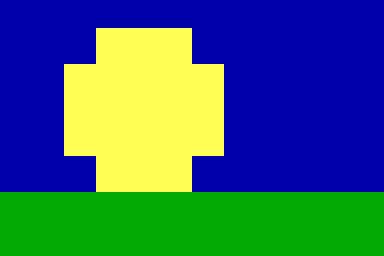
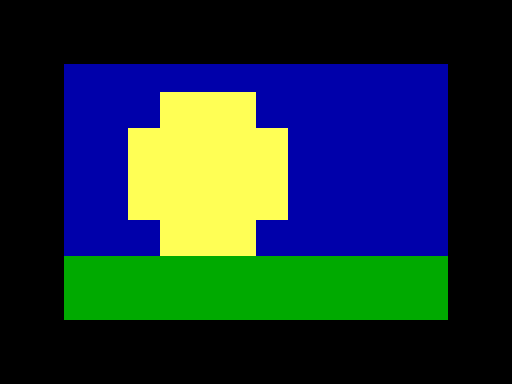
A 12 × 4 sun over grass, grown to 16 × 6 about the centre, before and after (blockwright --screenshot, scale 2; canvas-size.steps.json):
A step at the canvas's own size changes nothing. replay still writes its capture and notes on stderr, with exit status 0:
blockwright-cli: note: c.json: step 1 (same): changes nothing
The step takes no Tool Options, because its "size" is the canvas's, not the brush's. It takes "capture" and a "screenshot" as any step does, but no "pointer", since it has no point. Each of these is refused with exit status 1, and nothing is written:
blockwright-cli: c.json: step 1 (grow): canvasSize needs "size": [width, height], the new canvas in cells
blockwright-cli: c.json: step 1 (grow): "size" must be [width, height], the new canvas in cells
blockwright-cli: c.json: step 1 (grow): "size width" must be a whole number 1 to 400
blockwright-cli: c.json: step 1 (grow): "size height" must be a whole number 1 to 5000
blockwright-cli: c.json: step 1 (grow): "anchor" takes top-left, top, top-right, left, centre, right, bottom-left, bottom, bottom-right, not "center"
blockwright-cli: c.json: step 1 (grow): "anchor" must be a string, not a number
blockwright-cli: c.json: step 1 (grow): canvasSize takes no "fg"
blockwright-cli: c.json: step 1 (grow): "screenshot pointer" needs a step the pointer makes, with "points", "from" and "to", "at" or select's "rect"; this canvasSize step has none
blockwright-cli: c.json: step 9 (grow): the canvas can't be made 400 x 5000: the layers would hold over 16000000 cells
The last is the dialog's own refusal: the layers together may hold no more than 16000000 cells. blockwright --screenshot refuses all of them too, and one more, as the dialog does: a canvas it can't draw. 400 × 5000 can be drawn with 8-pixel cells but not with 9 px letter spacing, so on a piece with 9 px letter spacing replay makes it and --screenshot stops there, whether or not the step asks for a picture:
blockwright: step 1 (grow): the canvas is too large to display
Sample merged
"sampleMerged": true or false, on a fill or eyedropper step, is Sample merged in Tool Options. It is off unless a step turns it on, as in the editor.
- Off, the two tools read the active layer alone. Fill floods the layer's own pixels, so on a clear layer it fills the whole layer. The eyedropper picks from the layer's own cell, and a pick from a transparent cell or pixel leaves the pen as it was, with a note:
blockwright-cli: note: m.json: step 2 (pick): pixel (0, 0) is transparent; the pen is unchanged. - On, they read the canvas as it shows: every visible layer combined, leaving out hidden and Reference layers. Fill finds the area there and paints it into the active layer. On a Cells layer that isn't alpha-locked, a clear cell the area only half covers takes its other half from what the layers below show there, so that colour lands in the active layer too. A layer above the active one can bound the area, but its colours aren't copied into the active layer.
Like any Tool Option it holds for the steps after it, on later fill and eyedropper steps, until a step sets it again. A fill or eyedropper step with no "at" only sets it. blockwright --screenshot ticks the box in Tool Options.
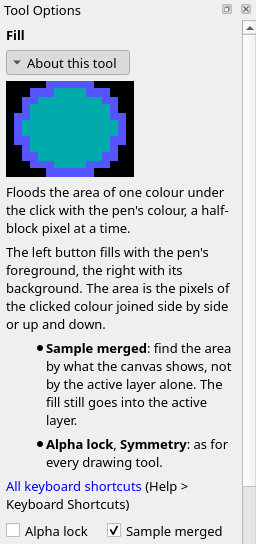
A red frame on the bottom layer, and a fill inside it with the yellow pen on a clear Cells layer above: off, then on (sample-merged.steps.json):


Under the IRC target the eyedropper picks as the editor's does: a left-button pick takes the cell's bold, italic and underline into the pen along with its colour, and the glyph brush then paints with them on a Cells layer. A right-button pick takes the background colour alone.
Only fill and eyedropper take the key: on any other step it is refused, even as false. A value that isn't true or false is refused too. Each stops the replay with exit status 1:
blockwright-cli: m.json: step 2 (fill): "sampleMerged" must be true or false, not a number
blockwright-cli: m.json: step 2 (pick): "sampleMerged" must be true or false, not a string
blockwright-cli: m.json: step 2 (dab): halfBlock takes no "sampleMerged"
The clone stamp
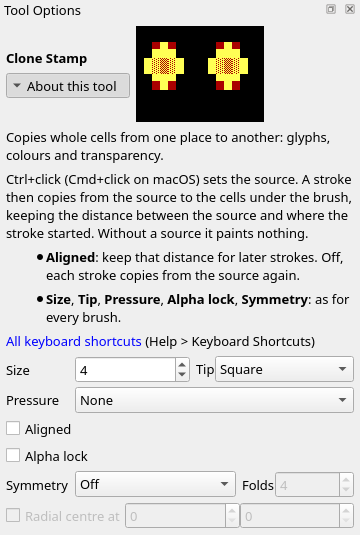
A clone step is the Clone Stamp (The clone stamp). "source" is the cell Ctrl+click sets, and "points" are the stroke that copies from it:
{"name": "source", "action": "clone", "source": [93, 36]},
{"name": "head", "action": "clone", "size": 4, "points": [[62, 44], [72, 44]]},
{"name": "body", "action": "clone", "points": [[62, 48], [72, 48]], "aligned": false}
| Key | Value | What it sets |
|---|---|---|
"source" |
[x, y], a cell on the canvas |
The cell to copy from, set before the stroke. It holds for later clone steps, across steps of other kinds, until a clone step sets another |
"points" |
Cells, as any brush stroke's | Where the copy goes: every cell the brush covers takes the cell at the stroke's distance from it. On the first stroke after a source, or with Aligned off, that is the distance from the source to the first point, so the cell under the first point takes the source cell. Without points the step sets only the source and Tool Options, and writes its capture with no note |
"aligned" |
true or false |
Aligned in Tool Options: on unless a step turns it off. Like any Tool Option it holds for the steps after it |
A stroke needs a source, on its own step or an earlier clone step. "button" is taken, as by any stroke, but either button copies the same.
- Aligned on, the first stroke after a source sets the distance from the source to where the stroke starts, and every later stroke copies at that distance, so a second stroke goes on copying the same stretch. A new
"source"starts again: the next stroke sets the distance afresh. - Aligned off, every stroke copies from the source again. It still sets the distance, so a stroke after Aligned is turned back on keeps the distance of the last stroke, not of the first.
- The step reads the canvas as it was when the stroke began, so a copy that runs over its own source copies what was there before. With the source on the
AofABCDEFGHand a stroke along the same row from theBto theE, the row becomesAABCDFGH. - It copies whole cells, glyph and both colours, and only within the active layer: on a clear layer it finds nothing to copy. Size and Tip set the cells each point covers. A selection and Alpha lock limit the cells it writes, and under Symmetry each mirrored or turned copy reads from the source's mirrored or turned cell, as in the editor.
blockwright --screenshotmarks the source with a dotted box round its cell and shows Aligned in Tool Options. With"pointer": truethe pointer is on the source before the step, as the Ctrl+click comes first, and after it on the stroke's last point, or on the source when the step has no points.
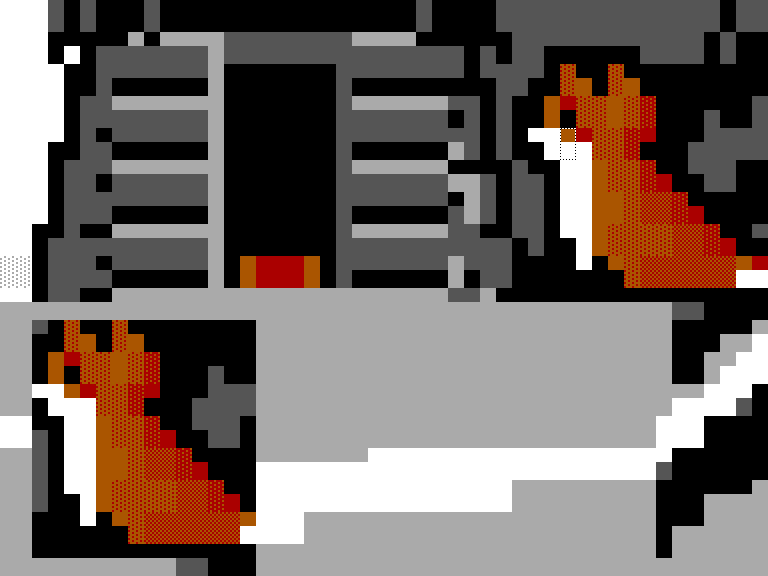
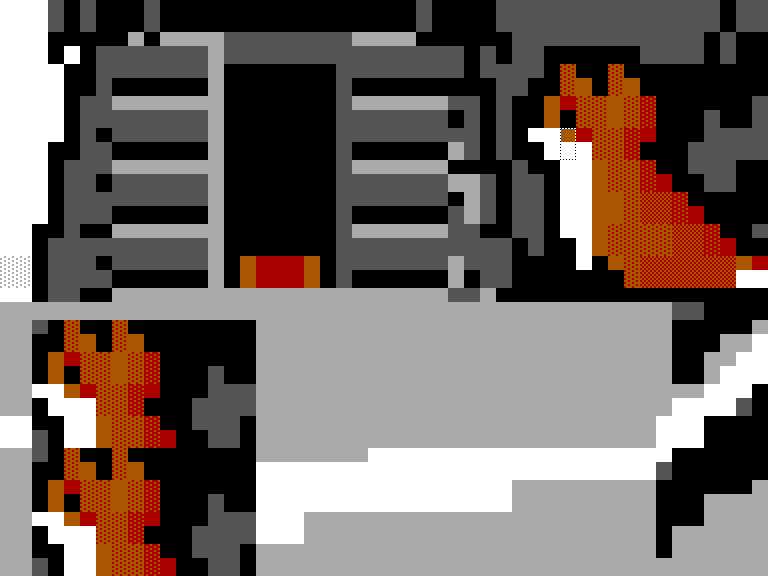
The fox in Spruce Island, a 120 × 50 piece by funkpower, copied onto the snow with a 4 × 4 square brush: the source set on its face, a first stroke along row 44, and a second along row 48, each from column 62 to 72 (blockwright --screenshot, scale 1, in a window large enough to show the cells cropped; clone-aligned.steps.json and clone-unaligned.steps.json):
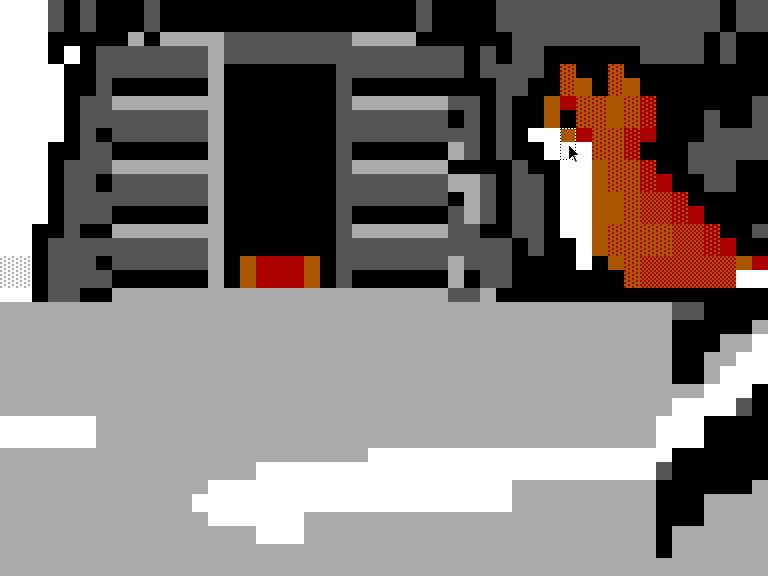
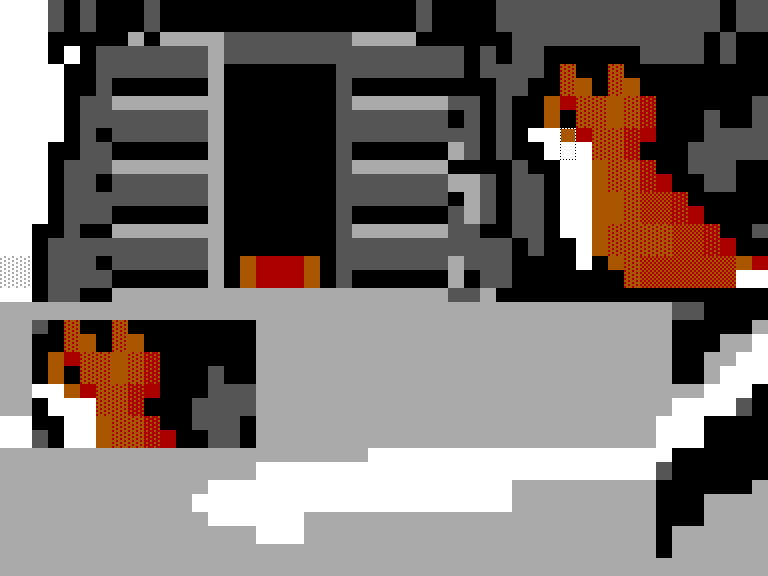
With Aligned on, the second stroke carries on below the first, and the copy is the whole fox. With Aligned off, it starts from the source again and copies the head a second time:
A stroke that copies blank onto blank changes nothing, and replay notes it on stderr, with exit status 0: blockwright-cli: note: c.json: step 3 (dab): changes nothing. Each of these is refused with exit status 1, and nothing is written:
blockwright-cli: c.json: step 2 (dab): clone needs a source to copy from: "source": [x, y], the cell Ctrl+click sets, on this step or an earlier clone step
blockwright-cli: c.json: step 2 (source): source cell (9, 1) is off the 8 x 4 canvas
blockwright-cli: c.json: step 2 (source): "source" must be [x, y], not a string
blockwright-cli: c.json: step 2 (source): "aligned" must be true or false, not a number
blockwright-cli: c.json: step 2 (dab): halfBlock takes no "aligned"
blockwright-cli: c.json: step 2 (source): clone takes no "sampleMerged"
Only a clone step takes "aligned", even as true, and a clone step takes no "sampleMerged".
The text tool
A text step is the Text tool (Text layers and TheDraw fonts): a click at "at", then "text" typed there, which makes a new live text layer. "textOptions" holds the rows Tool Options shows for the tool:
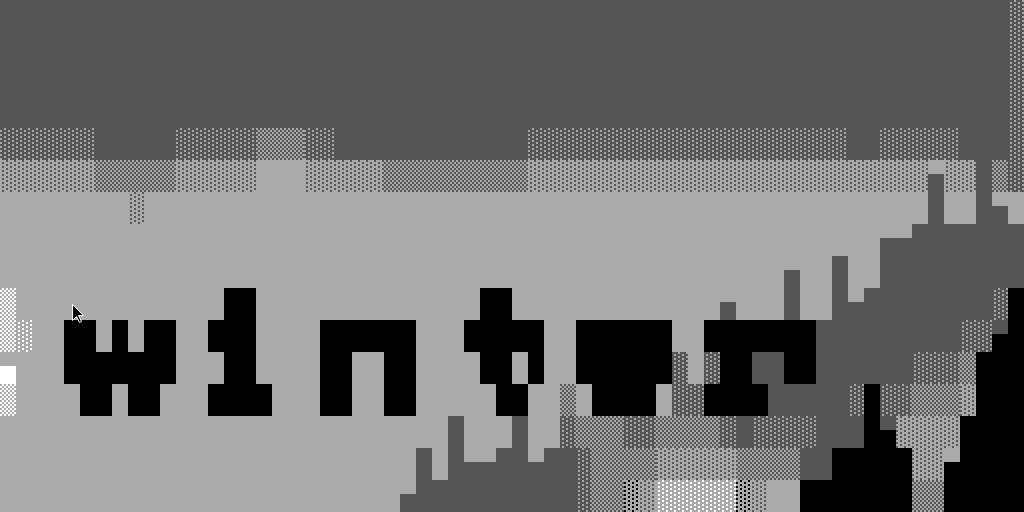
{"name": "caption", "action": "text", "at": [28, 9], "text": "winter", "textOptions": {"colour": 0}},
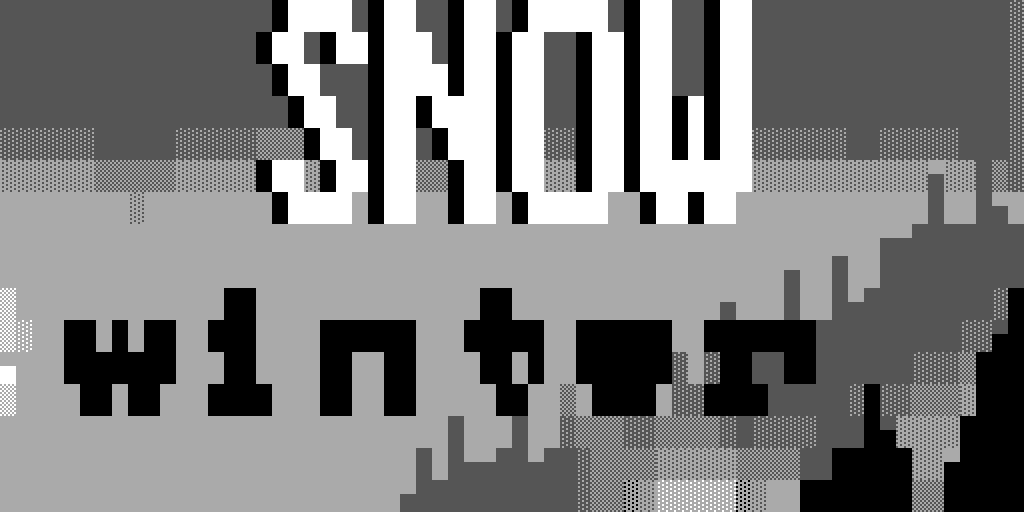
{"name": "headline", "action": "text", "at": [40, 0], "text": "SNOW", "textOptions": {"bigStyle": "shadow", "bigColours": [0, 1]}},
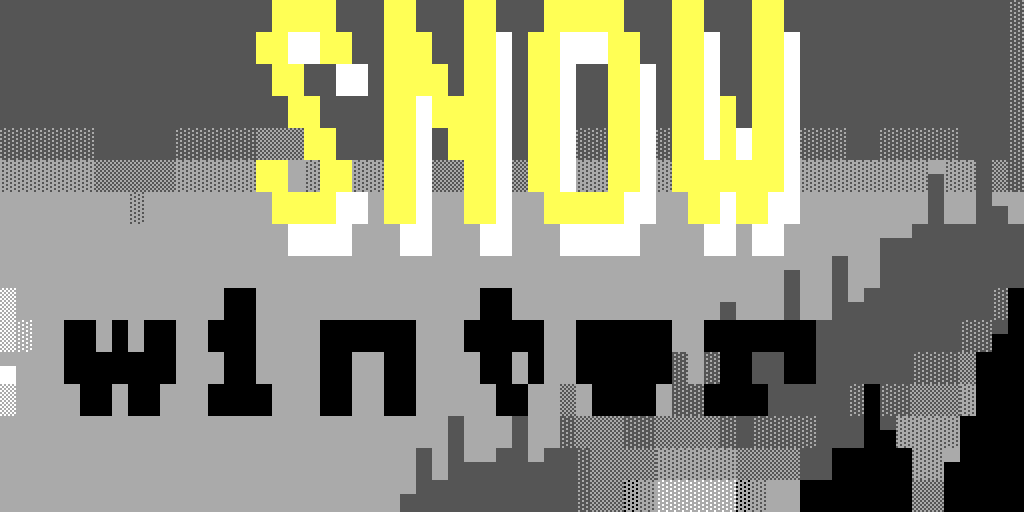
{"name": "restyle", "action": "text", "textOptions": {"bigStyle": "3d", "letterSpacing": 1}}
| Key | Value | What it sets |
|---|---|---|
"at" |
[x, y], a cell on the canvas |
Where the click goes, and the top-left cell of the letters. It must be off every visible, unlocked text layer, anywhere in the layer's box, not just on its letters: a click there would edit that layer, and a step only makes new ones. A click on a hidden or locked text layer makes a new layer |
"text" |
A string of 1 to 4096 characters | What is typed, as typed (not NFC-composed, unlike a keyboard step). A character the face has no glyph for is kept in the text and leaves a blank as wide as a space |
"textOptions" |
An object, each key optional | The Text tool's Tool Options, below. The keys a step leaves out keep their settings. Only a text step takes it |
"textOptions" key |
Value | Tool Options row | Default |
|---|---|---|---|
"face" |
"block", "vga" or "mini", the bundled faces, or a TheDraw font, {"tdf": ..., "font": ...} (A TheDraw font) |
Face | "block" |
"bigStyle" |
"none", "shadow", "3d", "outline", "block" or "rainbow" |
Big style | "none" |
"bigColours" |
An array of 1 to 16 mIRC colour numbers, 0 to 15 | Colours, beside Big style | The big style's own |
"colour" |
0 to 15, a palette index | Colour | 7 |
"case" |
"as-typed" or "capitals" |
Case | "as-typed" |
"wrap" |
0 to 65535 columns, 0 for none | Wrap | 0 |
"align" |
"left", "centre" or "right" |
Align | "left" |
"letterSpacing", "lineSpacing" |
0 to 64 | Spacing: Letters and Lines | 0 |
"text"is taken as typed:"\n"is Enter and starts a new line, and any other control character (U+0000 to U+001F, U+007F, or the C1 controls U+0080 to U+009F) is refused, as the Text tool drops them; U+00A0 and above are typed.- Each step with
"at"makes a layerText Njust above the active layer and makes it the active layer, as a click and typing do in the editor. Its blank cells are clear, so the art below shows through. The text's colour is"colour", not"fg": atextstep takes"fg"and"bg", as any step does, but they don't colour it. - A big style puts in its own colours, unless the step gives
"bigColours", and draws in theblockface. A later step that picks another big style puts in that style's colours in the same way: Big 3D's are 8 and 0, yellow and white. The face staysblockafter"bigStyle": "none", until a step sets another. Under a big style Tool Options greys out Face and Colour, so a step refuses a"face"other than"block", and any"colour". Without a big style Colours is greyed out too, so"bigColours"needs one, set on the same step or one before it. - No step changes an existing layer's text.
- A step with
"textOptions"and no"at"sets them as Tool Options does. With a text layer active, they go on that layer's settings, which become the defaults for the next text, and on the layer, unless it is locked: a locked layer stays as it is and only the defaults change. With another kind of layer active, only the defaults change. blockwright --screenshotshows the Text tool's rows in Tool Options. With"pointer": truethe pointer is on"at", where the click goes. A step with neither"at"nor"textOptions"sets nothing and isn't noted, so it can take a picture of the settings the steps before it left.
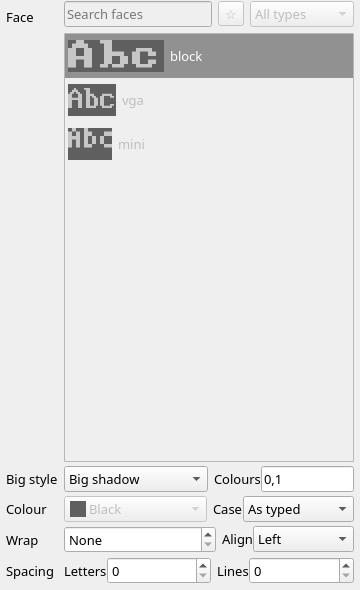
On the sky of Spruce Island, a 120 × 50 piece by funkpower: winter in black in the block face, SNOW above it in Big shadow with mIRC white letters and a black shadow, and a step with no "at" that restyles the headline, the active layer, to Big 3D with a column between letters (blockwright --screenshot, scale 1, in a window large enough to show every Tool Options row; text.steps.json):
A step with no "at" whose settings Tool Options already shows (the active text layer's, else the defaults) changes nothing, and replay notes it on stderr, with exit status 0: blockwright-cli: note: t.json: step 2 (same): changes nothing. Its defaults don't change either. Each of these is refused with exit status 1, and nothing is written:
blockwright-cli: t.json: step 2 (again): cell (7, 1) is on the text layer "Text 1", which a Text tool click there edits; a text step makes a new text layer, so click off every visible, unlocked text layer
blockwright-cli: t.json: step 1 (title): "text" holds a control character the Text tool doesn't type (U+0009); only "\n", Enter, starts a new line
blockwright-cli: t.json: step 1 (title): "text" must be 1 to 4096 characters
blockwright-cli: t.json: step 1 (title): text needs "text" to type at its "at" cell: a click with nothing typed makes no text layer
blockwright-cli: t.json: step 1 (title): "text" needs an "at" cell to start from
blockwright-cli: t.json: step 1 (title): "textOptions face" takes a bundled face (block, vga, mini) or a TheDraw font ({"tdf": ..., "font": ...}), not "thedraw"
blockwright-cli: t.json: step 1 (title): "textOptions face" "vga" can't be picked under a big style, which draws in the block face (Tool Options' face picker is off)
blockwright-cli: t.json: step 1 (title): "textOptions colour" can't be set under a big style, which "bigColours" colours (Tool Options' colour is off)
blockwright-cli: t.json: step 1 (title): "textOptions bigColours" needs a big style (Tool Options' colours are off without one)
blockwright-cli: t.json: step 1 (title): "textOptions bigColours" must be an array of 1 to 16 mIRC colours 0 to 15
blockwright-cli: t.json: step 1 (title): "textOptions align" takes left, centre, right, not "center"
blockwright-cli: t.json: step 1 (edge): line takes no "textOptions"
The first is a click at [7, 1], beside an i typed at [1, 1] in the block face: the letter is two columns short of it, but the layer's 8 × 4 box takes it in. A text step takes no "button" and no "sampleMerged".
A TheDraw font
"face" may name a TheDraw font instead of a bundled face: a .tdf file and the font's name in it. Blockwright ships no TheDraw fonts, so the file is one of yours, named relative to the steps file (Paths in a steps file). Here fonts/titles.tdf, beside the folder the steps file is in, holds three fonts, BW Outline, BW Block and BW Colour, at places 0, 1 and 2:
{"name": "title", "action": "text", "at": [1, 1], "text": "Funk", "textOptions": {"face": {"tdf": "../fonts/titles.tdf", "font": "BW Outline"}}},
{"name": "restyle", "action": "text", "textOptions": {"face": {"tdf": "../fonts/titles.tdf", "font": "BW Block", "index": 1}}},
{"name": "caption", "action": "text", "at": [1, 16], "text": "art", "textOptions": {"letterSpacing": 1}}
"face" key |
Value | What it names |
|---|---|---|
"tdf" |
A path to a .tdf file, relative to the steps file |
The font file. Required |
"font" |
The font's name as the file holds it, not empty | The font in the file. Required |
"index" |
0 to 255 | The font's place in the file, counting from 0. Needed only when two fonts in the file have the name; when it is given, the font at that place must have the name |
- The face is picked as in the face picker, and it holds for later
textsteps as a bundled face does:captionabove setsartinBW Blocktoo, on a new layerText 2. - The font draws in its own colours, as in the editor (Text layers and TheDraw fonts): a step may set
"colour", but the letters don't change. - When a layer is set in the font, a new one or the active one restyled, the font file is copied into the project as
fonts/<sha256>.tdf, named by the sha256 of its bytes (Projects (.bwp)), so a--projectcapture opens and draws its text without the steps file's fonts. A step that changes only the defaults (no text layer active, or a locked one) copies nothing; the file goes in with the first layer set in the font. A project keeps only the files its text layers use: restyle the one layer in a font into another file's font, and the next capture no longer holds the first file. - A project holds at most 16 font files, so a step that would leave the text layers using a 17th file is refused.
- A big style draws in the
blockface, so a step refuses a TheDraw font under one, as it refuses"vga". - A step with no
"at"that names the face Tool Options already shows changes nothing, andreplaynotes it, as for any other setting.
Each of these is refused with exit status 1, and nothing is written. A font the file doesn't hold, a name two of its fonts share, and an "index" that doesn't fit list the fonts the file holds:
blockwright-cli: t.json: step 1 (title): font "BW Shadow" is not in ../fonts/titles.tdf; it holds 0 "BW Outline", 1 "BW Block", 2 "BW Colour"
blockwright-cli: t.json: step 1 (title): 2 fonts in ../fonts/twins.tdf are named "BW Outline"; give "index" to pick one: it holds 0 "BW Outline", 1 "BW Outline"
blockwright-cli: t.json: step 1 (title): ../fonts/titles.tdf has no font at index 3; it holds 0 "BW Outline", 1 "BW Block", 2 "BW Colour"
blockwright-cli: t.json: step 1 (title): the font at index 0 in ../fonts/titles.tdf is "BW Outline", not "BW Block"; it holds 0 "BW Outline", 1 "BW Block", 2 "BW Colour"
blockwright-cli: t.json: step 1 (title): "textOptions face index" must be a whole number 0 to 255
blockwright-cli: t.json: step 1 (title): ../fonts/notes.tdf: not a TheDraw font file: TheDraw font, byte 0: no TheDraw font signature
blockwright-cli: t.json: step 1 (title): "textOptions face" needs "tdf", the .tdf file's path
blockwright-cli: t.json: step 1 (title): "textOptions face" needs "font", the font's name in the file
blockwright-cli: t.json: step 1 (title): "textOptions face font" is empty
blockwright-cli: t.json: step 1 (title): "textOptions face" has no "file"
blockwright-cli: t.json: step 1 (title): "textOptions face" "BW Block" (../fonts/titles.tdf) can't be picked under a big style, which draws in the block face (Tool Options' face picker is off)
blockwright-cli: t.json: step 17 (word-17): the text layers would use over 16 TheDraw font files, more than a project holds
A file that isn't a TheDraw font is refused with the reason the font reader gives, here a file that doesn't start like one. A key the face doesn't take is refused as a key it has none of: a "file" beside "tdf" and "font" gives the has no "file" line. A path that is refused, or a file that can't be read, stops the replay before the first step (Paths in a steps file).
Pictures of the window
blockwright --screenshot <steps.json> -o <dir>
--screenshot is an option of the editor, blockwright, not of blockwright-cli. It plays the same steps file in the editor's window, offscreen, and writes a PNG for each step that has a "screenshot", as NN-<name>.png, NN numbered as for replay. A picture taken before the step is NN-<name>-before.png; the one taken after is NN-<name>-after.png when "when" is "both" or the step has "capture": "before-after". A "screenshot" is:
{"of": "window" | a dock or widget's object name,
 "crop": {"cells": [x, y, w, h]} | {"pixels": [x, y, w, h]},
 "when": "before" | "after" | "both",
 "scale": 1 | 2,
 "pointer": true | false}
"of" is "window" when left out, "when" is "after", "scale" is 1 and "pointer" is false. A crop of "cells" needs "of" to hold the canvas, with the cells in view; one of "pixels" is in the pixels of "of". The file's top-level "window": [w, h] sizes the window, 1280 × 800 without one. A file with no step that asks for a screenshot writes no picture and exits with status 0, saying blockwright: ok.json: no step asks for a screenshot.
"scale": 2 draws the picture at twice the pixels each way. It isn't an enlargement: the window keeps its size and is laid out again at a device pixel ratio of 2, as a high-DPI screen shows it, so the default 1280 × 800 window comes out 2560 × 1600 and a crop gives twice its pixels. Any scale but 1 or 2 is refused (step 1 (dab): "screenshot scale" must be a whole number 1 to 2).
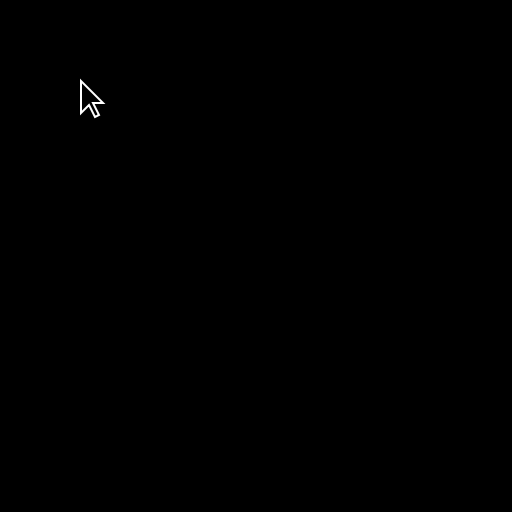
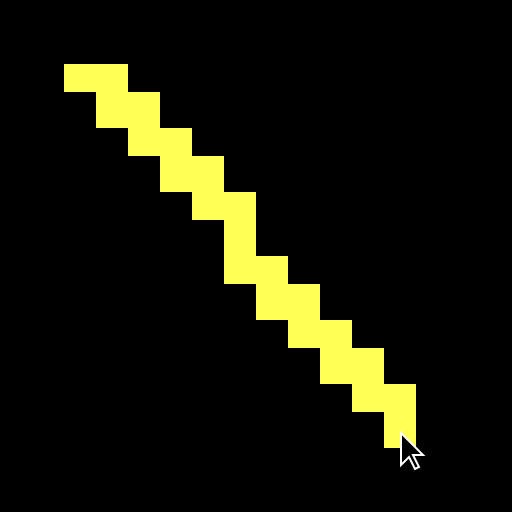
"pointer": true draws a mouse pointer, a plain black arrow with a white edge, with its tip where the step left the mouse: at the step's last point ("to", "at", the last of "points", the bottom-right cell of a select step's "rect"), or at its first in a picture taken before the step. The tip is at the middle of the cell, or of the half of the cell a half-block pixel is. A line, before and after, at scale 2:
A pointer is refused, with exit status 1 and nothing written, when its value isn't true or false, when the step has no point to put it at (a tool step with no points, a menu, layer or dock action, a move or moveSelection by an offset, a view step), and when the picture doesn't show the point:
blockwright: p.json: step 1 (dab): "screenshot pointer" must be true or false, not a number
blockwright: p.json: step 1 (all): "screenshot pointer" needs a step the pointer makes, with "points", "from" and "to", "at" or select's "rect"; this selectAll step has none
blockwright: step 1 (dab): a pointer needs "of" to hold the canvas, and "layers" doesn't
blockwright: step 1 (dab): the pointer's cell [190, 3] is not in view in the 1280 x 800 window
blockwright: step 1 (dab): the pointer's cell [8, 3] is outside the picture
The first two, and the refused scale, are errors in the file itself, so blockwright-cli replay refuses the file over them too, with the same message after blockwright-cli:. The last three need the window, so only --screenshot meets them.
The pictures don't depend on the machine's screen or settings. The window runs offscreen on fixed screens at 96 dpi that no scaling setting in the environment reaches, in Qt's Fusion style with default settings, and its text is in Noto Sans at 10 pt, built into Blockwright, so the same steps file makes the same PNG bytes on every run. Noto Sans has no █ ▓ ▒ ░ or half blocks ▀ ▄ ▌ ▐, so where the window's own widgets show those (the Glyphs bar's set names, the status bar's F-keys, Tool Options' help) they come from a system font, and on another machine the docks can sit a pixel or two higher or lower and Tool Options' help can wrap differently. The canvas is drawn in Blockwright's own fonts everywhere.
A view step sets what the window shows, for the pictures after it:
{"name": "fit-on", "action": "view", "ircFit": true}
| Key | Value | What it sets |
|---|---|---|
"zoom" |
1 to 8 | The canvas's zoom, as View > Zoom In (Ctrl+=) and View > Zoom Out (Ctrl+-) set it (Views) |
"scrollTo" |
[x, y], a cell |
Scrolls so that cell is at the canvas view's top left, as far as the scroll bars go: at the canvas's right or bottom edge they stop short |
"ircFit" |
true or false |
View > IRC > Fit Lines to the Budget (no shortcut) on or off |
"ircPad" |
true or false |
View > IRC > Pad Lines (no shortcut) on or off |
"ircSwapShades" |
true or false |
View > IRC > Swap Shades (no shortcut) on or off |
The three IRC settings are the ones in Making rows fit, and the row meter and the IRC View dock follow them as they do the menu. Every key is optional, but a view step needs at least one; an empty one is refused (step 1 (empty): view needs at least one of "zoom", "scrollTo", "ircFit", "ircPad" or "ircSwapShades"). A key left out leaves that setting as it was. A view step takes a "screenshot" but no Tool Options: "fg" on one is refused with step 1 (v): view takes no "fg". A "scrollTo" cell must be on the canvas as it stands at that step; one off it is refused (step 2 (far): scrollTo cell (20, 0) is off the 20 x 10 canvas). Every refusal exits with status 1.
A view step takes effect where it stands and holds until a later view step changes it. A screenshot taken "before" a view step shows the view the steps before it left. Until the first view step the window has a new window's view: zoom 2, scrolled to the top left, Fit, Pad and Swap Shades off. Within one step the zoom is set before the scroll. A view step changes the window, not the piece: it makes no undo step and doesn't mark the document modified.
The editor's action list
blockwright --list-actions is an option of the editor, blockwright, not of blockwright-cli. It prints every menu and dock action as a JSON list and exits: each action's id, menu, text, default shortcuts, tips and more. It lists every action, including ones the open document doesn't offer. Glyph sets 17 to 21 (glyphSet17 to glyphSet21), which are offered only under the IRC target or in a UTF-8 document (Sets 17 to 21), carry "offeredWhen": "in IRC and UTF-8 documents"; no other action has offeredWhen.
Exit status
| Status | Meaning |
|---|---|
| 0 | Success |
| 1 | An input that can't be read or an output that can't be written; a convert, shade, pack, unpack or snapshot that would lose data, without --allow-lossy; a library check that found a problem; a generator or scene that failed; a replay step that can't be applied, or any view step in a file given to replay. Nothing is written. Also an error the command didn't expect, such as one from the file system: it prints blockwright-cli: <command>: and the error's message, and ends the run |
| 2 | A usage error: an unknown command or option, an option the command doesn't take, a missing argument, a value out of range |
| 3 | export --irc found a line over the budget, without --allow-over-budget. Nothing is written |
| 4 | lint found something other than a note |
Examples
Draw a piece at 2× for a web page:
blockwright-cli render --scale 2 piece.ans piece.png
Check that every line fits an IRC message, and write the IRC text:
blockwright-cli export --irc piece.ans piece.irc
Lint a piece and fail a script when it has findings:
blockwright-cli lint piece.ans || echo "lint found something"
Turn a piece into a project directory, and save its first snapshot:
blockwright-cli unpack piece.ans piece/
blockwright-cli snapshot piece/
Every option
The command's own help, blockwright-cli --help:
Usage: blockwright-cli [options] command [args...]
Headless Blockwright.

Commands:
  info <file>          dimensions and SAUCE fields
  convert <in> <out>   read an .ans and write it back out as .ans, XBIN
                       (<out> named .xb) or BIN (.bin); <out> may be
                       <in>, which is rewritten in place (export and
                       render refuse to write over their input); a
                       .bwp <out> is refused: pack writes a project
  render <in> <out>    draw an .ans as a PNG with the IBM VGA font; a .bwp
                       <out> is refused
  export --irc <in> <out>
                       write IRC text (mIRC colour codes) and report each
                       line's size in bytes; a project's own budget is
                       the default; a .bwp <out> is refused
  export --micron <in> <out>
                       write a Micron page (.mu) for NomadNet: the piece
                       in its own colours, left-aligned or --centre,
                       with a #!c= cache header if --cache S is given;
                       a .bwp <out> is refused
  shade --ramp R <in> <out>
                       lighten (or --darken) every cell in the box one
                       rung along the ramp's shading ladder, then check
                       the ladder; <out> may be <in>. A piece without
                       iCE colours keeps them off (no shade that needs
                       a bright background) unless --ice turns them on
  shade --form dome|cylinder|plane, --despeckle or --rim
                       one pass of the form, despeckle or rim-light
                       brush over the box, the non-blank cells of a
                       --mask piece the size of <in>, or the mask's cells
                       in the box, lit from --light
  lint <in>            the ladder check under each --ramp (default: every
                       named ramp and the craft pairs), pixel noise and
                       the craft rules; one line per finding (x,y kind
                       ramp message) and a summary, or --json. Exits 4
                       when there are findings other than notes. --target
                       irc (default: a project's own, else ansi) turns
                       no-cp437 off and counts what an .ans save drops
                       instead (ans-loss, a note: printed with "note:",
                       it exits 0); wasted-format flags bold, italic or
                       underline on a cell where it draws nothing
  render --irc <in> <out.png>
                       draw the IRC view: the mIRC palette, what IRC
                       drops, and each line cut at --budget bytes, 1 to
                       512 (default: a project's own, else 407); --fit,
                       --pad and --swap-shades apply as in export --irc
  library list [dir]   list the stamps and text styles in dir (default:
                       the bundled and user libraries): kind, category,
                       name, size, widest IRC row in bytes, ice when a
                       text style needs iCE colours, tags, path;
                       tab-separated (a text style's size and bytes are
                       its thumbnail sample's)
  library check <dir>  check every stamp, sidecar and text style in dir,
                       drawing each text style's sample
  pack <in> <out.bwp>  write an .ans or a project as a project zip
  unpack <in> <dir>    write an .ans or a project as a project directory;
                       <dir> must be empty or a project already. A
                       project can't hold an XBIN's palette or font:
                       pack and unpack drop them only with --allow-lossy.
                       --target ansi|irc sets the project's target
                       (default: a project's own, else ansi)
  snapshot <project>   save the flattened composite as the project's next
                       round (snapshots/rN.ans) and print rN
  add-generator <project> <dir>
                       add a generator layer on top, from a directory
                       with a generator.json (and params.json, scripts),
                       run it once and save the project
  run-generators <project>
                       run the project's visible generator layers (or
                       each --layer, hidden or not) again and save their
                       output; this runs the programs their
                       generator.json names
  import-scene <scene.py> <out>
                       open a layered Python scene (one that answers
                       --list-layers) as a new project with a generator
                       layer for each of its layers, run once; <out> is a
                       .bwp zip, or else a directory that doesn't exist or
                       is empty. This runs the scene with python3; on
                       Windows with the first of py -3, python and python3
                       that is Python 3.
                       To rebuild a project byte for byte: --bake writes
                       the layers as cells without the scene's path,
                       --author and --date set SAUCE's, and
                       SOURCE_DATE_EPOCH stands in for today
  replay <steps.json> -o <dir>
                       apply a steps file's edits through the editor's
                       tools and write the canvas after each step as
                       NN-<name>.ans (and .bwp with --project, .png with
                       --render); replay --help gives the format

Every command that reads an .ans also reads an XBIN (.xb) or BIN (.bin),
and a project (a .bwp zip or a project directory) as its flattened
composite. convert and shade write XBIN to an <out> named .xb and BIN
to one named .bin. convert, shade, export --irc and render refuse an
<out> named .bwp: pack writes a project.

An .ans is read as CP437, or as UTF-8 when it starts with a byte order
mark or is all well-formed UTF-8 with a sequence of three bytes or more
(the block and box glyphs terminals draw with); --encoding cp437 or
utf-8 says which. info prints the one it was read as. convert, shade
and replay write an .ans as CP437, or as UTF-8 with --output-encoding
utf-8 (SAUCE stays CP437; a byte order mark only when the text has no
sequence of three bytes or more). snapshot writes the project's own
encoding, or the one --output-encoding gives. Everything else is
written as CP437.

Options:
  -h, --help               Displays help on commandline options.
  --help-all               Displays help, including generic Qt options.
  -v, --version            Displays version information.
  --allow-lossy            convert, shade, pack, unpack, snapshot, replay:
                           write even if something can't be represented
  --scale <N>              render, replay --render: integer zoom, nearest
                           neighbour (1-8, default 1)
  --font-width <px>        render, replay --render: glyph width 8 or 9
                           (default: SAUCE letter spacing, else 8)
  --irc                    export: IRC text with mIRC colour codes; render: the
                           IRC view
  --budget <bytes>         export --irc, render --irc: bytes a line may take, 1
                           to 512 (default: a project's own, else 407, EFnet via
                           WeeChat)
  --fit                    export --irc, render --irc: fit lines over the
                           budget by merging their least visible colours
  --pad                    export --irc, render --irc: keep trailing black
                           cells and blank edge rows, ending rows on a black
                           block
  --swap-shades            export --irc, render --irc: let the encoder draw a
                           shade as its opposite with the colours reversed
  --micron                 export: a Micron page (.mu) for NomadNet
  --centre                 export --micron: centre the piece on the page
  --cache <S>              export --micron: write the page header #!c=S, the
                           seconds a peer may cache the page (0: never)
  --allow-over-budget      export --irc: write even if a line is over the
                           budget
  --ramp <ramp>            shade, lint: a ramp name (fire, steel, ...) or
                           palette indices dark to light, e.g. 0,8,7,15; lint
                           takes it more than once (default: every named ramp
                           and the craft pairs)
  --darken                 shade: darken (default: lighten)
  --steps <N>              shade: rungs to move each cell (1-64, default 1)
  --box <x0,y0,x1,y1>      shade, lint: cells x0,y0,x1,y1 from 0, corners
                           included (default: all)
  --form <shape>           shade: shade the selection as a form: dome, cylinder
                           or plane
  --glint                  shade --form: a glint of the ramp's top rung at the
                           brightest point (default: none)
  --despeckle              shade: clear the selection's specks
  --rim                    shade: light the selection's edge cells that face
                           the light
  --light <point>          shade --form, --rim: where the light comes from, N,
                           NE, E, SE, S, SW, W or NW (default: NW)
  --mask <mask.ans>        shade: a piece the size of the input whose non-blank
                           cells are the selection (with --box, those in the
                           box)
  --ice                    shade: turn iCE colours on (default: keep the
                           piece's)
  --json                   lint: the findings as JSON
  --name <name>            add-generator: the layer's name (default: the
                           directory's)
  --layer <id>             run-generators: run this generator layer (an id, as
                           info lists them), even a hidden one; more than once
                           for several (default: every visible one)
  --timeout <S>            add-generator, run-generators, import-scene: seconds
                           a generator may run (1-3600, default 30)
  --bake                   import-scene: write each layer as the cells it made,
                           without its script, so the project doesn't name the
                           scene's path; its layers can't be run again
  --author <name>          import-scene: the SAUCE author, 1 to 20 CP437
                           characters
  --date <CCYYMMDD>        import-scene: the SAUCE date, a day as CCYYMMDD
                           (default: SOURCE_DATE_EPOCH's day in UTC when it is
                           set, else today)
  --encoding <enc>         info, convert, render, export, shade, lint, pack,
                           unpack: read each .ans input as auto, cp437 or utf-8
                           (default: auto, UTF-8 when it has a byte order mark
                           or is all well-formed UTF-8 with a sequence of three
                           bytes or more, else CP437)
  --output-encoding <enc>  convert, shade, snapshot, replay: write an .ans
                           output as cp437 or utf-8 (default: cp437, and for
                           snapshot the project's encoding; SAUCE stays CP437)
  --target <target>        lint: lint for ansi or irc (default: a project's
                           own, else ansi); pack, unpack: the project's target
                           (default: a project's own, else ansi)
  -o, --output <dir>       replay: the directory the captures go in
  --project                replay: also write each capture as a .bwp
  --render                 replay: also write each capture as a PNG

Arguments:
  command                  info, convert, render, export, shade, lint, library,
                           pack, unpack, snapshot, add-generator,
                           run-generators, import-scene or replay
  args                     command arguments
Describes Blockwright 0.1.0 (12ee9ef).